Best Tesla Apps for Sentry Alerts, Stats and Automations
Tesla’s own app is the best choice for most owners. With it you can lock and unlock the car, handle climate and charging, see where the car is, switch Sentry Mode on and off, and find out when the security alarm goes off. A third-party app earns its place when there’s a specific extra you’re after: Sentry Mode alerts beyond the handful Tesla sends, a long-term record of drives, charging and battery health, alerts on how the car is driven while someone else has it, automations, or your data kept on your own server.
Two of those apps are ours. Sentry Pro handles Sentry Mode alerts and Sentry Driver handles trip and charge logs, and we split the work between them deliberately so you only pay for what you use. Below you’ll find what Tesla’s app covers already, where our apps come in, and the other apps worth a comparison.
| If you want | Look at |
|---|---|
| Sentry Mode alerts | Sentry Pro, TeslaFi, Tessie Pro |
| Drive, charging and battery history | Sentry Driver, Stats, TeslaFi, Teslascope, Tessie, TezLab |
| Alerts about how the car is being driven | Sentry Driver, Teslascope Pro, Tessie |
| Schedules and automations | Stats, TeslaFi, Teslascope Pro, Tessie Pro, TezLab |
| An Apple Watch app | Tesla’s own app, Stats, Tessie |
| Free or self-hosted | TeslaMate (self-hosted), Teslascope Free |
What the Tesla app already does
The basics are all in Tesla’s app: locking and unlocking, climate, charging, the frunk and trunk, and the car’s location, which you can follow on a map where Tesla offers that. Sentry Mode can be switched on or off from the app, and it sends notifications for things like the security alarm going off, charging and new software.
On Sentry Mode alerts, it does less than many owners expect. You’ll only get a notification when the alarm is triggered, when someone tries to open a door or the trunk, or when the car detects sudden jerky motion, plus a single one when Low Power Mode turns Sentry Mode off. Anything Sentry Mode doesn’t treat as a clear threat can be recorded without the alarm going off, and the app says nothing about it. For more on that gap, read Does Tesla notify you of Sentry Mode events?, and for the settings, see Tesla app notifications.
A few features sit behind Premium Connectivity: Live Camera, and viewing Sentry Mode and Dashcam clips in the app, which also requires an iPhone. Is Tesla Sentry Mode free? sets out what’s included. There’s also a Tesla-made Apple Watch app that locks and unlocks the car, opens the trunk and frunk, and doubles as a key. What it needs, and how alerts get to the watch, are in the Tesla Apple Watch app guide.
If that’s everything you’re after, there’s no need for another app.
How third-party apps connect
Most of these apps connect via Tesla’s own sign-in page, and every one of them has to ask what data you’ll share: Profile Information, Vehicle Information, Vehicle Location, Vehicle Commands, Vehicle Charging Management and two energy-product categories. To check or revoke that access, go to Account Settings > Security > Third Party Apps on tesla.com, or open the Tesla app and go to your name > Security and Privacy > Security > Third Party Apps.
If an app streams live data or sends commands, it usually needs its own virtual key on the car as well. With that key, the app can get real-time data and send commands, but only within what you approved at sign-in, and deleting the key from the car’s Locks screen ends both right away. To add the key, the app hands you a link or QR code that opens the Tesla app. TeslaMate is different because you host it yourself: you generate Tesla access tokens and enter them into your own installation.
Tesla allows these apps to connect through its API, but it doesn’t support using them to get into the car. Your way in should stay the Tesla app or a key, with any other app as an extra.
There’s an energy cost too. Requests from the Tesla app and from third-party apps are among the things that use energy while the car is parked and unplugged, and an app that keeps waking the car adds to it. For the other reasons a parked car loses energy, see Tesla phantom drain.
Before approving anything, read what you grant a third-party Tesla app, which walks through each permission, the virtual key and how to cut an app off.
Sentry Pro, Sentry Driver, or both
Most all-in-one apps bundle alerts, logs and remote controls into one subscription. The controls are already in Tesla’s app, and not everyone wants the logs, so we built two apps instead:
- Just want to know when something happens around the parked car? Sentry Pro is $5.99 a month or $49.99 a year, one subscription covers all your cars, and it never asks for your car’s location. It has been on the App Store since 2023.
- Just want your drives and charges logged? Sentry Driver is $4.99 a month or $44.99 a year for one car, less per year than TeslaFi, Tessie, TezLab or Stats.
- Want both? Use the two together for $94.98 a year, or $10.98 a month, against $129.99 a year or $12.99 a month for Tessie Pro.
Neither app duplicates the lock, climate and charging controls Tesla’s app already gives you, so you don’t pay for them twice.
Sentry Pro
- Best for: Sentry Mode alerts, Sentry Mode on a schedule, and an automatic horn, light or sound response.
- Platforms: iPhone and Android apps. There’s no watch app, but on an iPhone, its alerts can show on a paired Apple Watch like other iPhone notifications.
- Connects through: Tesla’s sign-in plus its virtual key on the car. Older Model S and Model X cars that can’t take a virtual key use Tesla’s third-party data streaming setting instead. It needs Vehicle Information; Vehicle Commands and Profile Information are optional, and it doesn’t request Vehicle Location.
- Price: $5.99 a month or $49.99 a year, with a 7-day free trial, or $133.99 once (a limited-time lifetime price). One subscription covers every Tesla you add.
- Alerts: An alert when Sentry Mode detects activity around the car, and a separate one when the alarm goes off, sent to each phone you’ve signed in on, with past events in its Activity screen. On iPhone, you can turn on Critical Alerts. Alerts, the schedule and Sentry Actions (a honk, a light flash or a boombox sound, which can change with the time of day) need a subscription, and the schedule and Sentry Actions also need the Vehicle Commands permission.
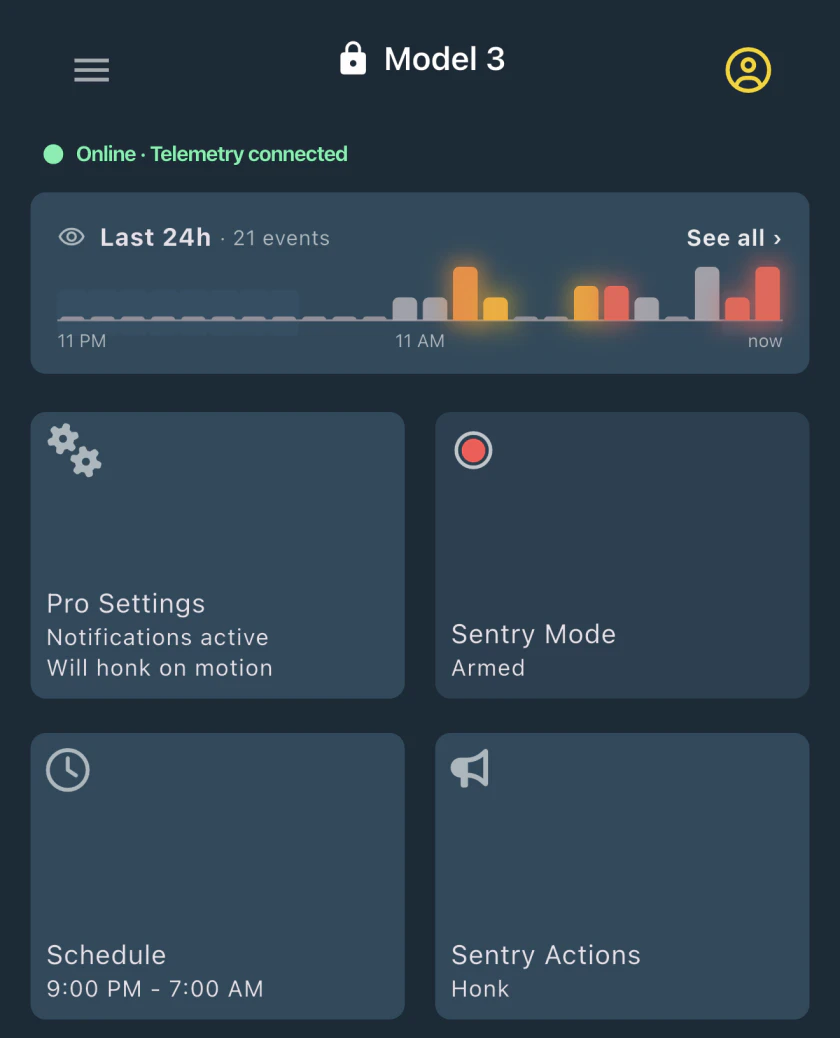
Sentry Pro doesn’t keep trip, charging or battery logs, show camera footage, or unlock the car, start the climate or manage charging. For the logs, add Sentry Driver; for the controls, use the Tesla app.
Sentry Driver
- Best for: An automatic log of your drives and charges, with what each charge cost and how the battery is holding up, plus alerts about how the car is driven when someone else has it.
- Platforms: iPhone and Android apps.
- Connects through: Tesla’s sign-in plus its virtual key on the car. Older Model S and Model X cars that can’t take a virtual key use Tesla’s third-party data streaming setting instead. It needs Vehicle Information; Vehicle Location (for maps, zones and per-location charging rates) and Profile Information are optional, and it doesn’t request Vehicle Commands. On your phone, it uses Bluetooth to tell when you’re the one in the car.
- Price: $4.99 a month or $44.99 a year for one car, with a 7-day free trial, or $99.99 once per car. Plans for two, three or five cars are $9.99, $14.99 and $24.99 a month, and Tesla’s fees are included.
- Alerts: Push alerts, sent to each phone you’ve signed in on, when the car goes over a speed you choose, brakes or accelerates hard, starts a drive during curfew hours you set, leaves an allowed zone or enters a restricted one, or may have been in an accident. Rules can stay quiet while you’re the one driving, and on iPhone, possible-accident alerts can be set to come through Do Not Disturb.
Drives are logged without a tap. Turn on charging detection and every charge is logged too, with its cost worked out from the rates you set for each charging location (per kWh, per minute, per session or by time of use) or entered by hand. Sentry Driver doesn’t send commands to the car, so it can’t lock it, run the climate or start a charge. Introducing Sentry Driver explains who it’s built for.
All-in-one apps
TeslaFi
- Best for: Detailed logging of drives, charges, battery health and the energy lost while the car sits parked, with Sentry alerts and automations built in.
- Platforms: Web, iOS and Android apps with push notifications and home-screen widgets, plus Amazon Alexa.
- Connects through: Tesla’s official Fleet API; you sign in on Tesla’s login page. The permissions you grant decide what it can do, including whether it can send commands.
- Price: $7.99 a month or $79.99 a year once a 14-day free trial ends, and the trial doesn’t ask for payment details.
- Alerts: Sentry Mode alerts when you’re away, sent by email, SMS, Pushover, Telegram or Discord, and alerts for things like a car left unlocked or a window left down. It can also switch Sentry Mode on after you park, either everywhere or only at places you pick.
Tessie
- Best for: Drive, charge and battery tracking plus alerts in a single app, with Sentry tracking and automations on Tessie Pro.
- Platforms: Web, iPhone and iPad, Apple Watch, Android, Wear OS and Amazon Alexa.
- Connects through: Sign in with Tesla. For Sentry tracking, Tessie’s Direct Telemetry has to be turned on.
- Price: Tessie is $6.99 a month or $69.99 a year, and Tessie Pro is $12.99 a month or $129.99 a year, per car, with a free trial. That includes Tesla’s fees.
- Alerts: Every plan has customizable alerts, among them driving alerts for going over a set speed or for the car arriving at or leaving a location. On Tessie Pro, Sentry tracking records Sentry events along with when and where they happened, and Movement and Alarms alerts let you know when motion is detected or the alarm goes off.
Sentry Pro vs Tessie puts Tessie and Sentry Pro head to head.
Other logging and stats apps
Stats
- Best for: Battery health, efficiency, charging history and phantom drain, broken down by day, week, month and location, on an iPhone.
- Platforms: iPhone, iPad and Apple Watch.
- Connects through: Tesla’s official API; it’s a registered third-party app.
- Price: $9.99 a month, $100 a year or $249.99 for a lifetime unlock, with a free trial. Add-ons like Dash-cam Viewing cost $14.99.
- Alerts: It notifies you if a door, the trunk or the frunk is left open or the car is left unlocked (with an optional automatic lock), and reminds you when the car is parked at home, unplugged and under a battery level you choose.
TeslaMate
- Best for: Keeping logs of drives, charges and battery health on hardware you control, with Grafana dashboards.
- Platforms: Self-hosted. It runs in Docker on an always-on machine of your own, and you use it through its web interface and dashboards.
- Connects through: Tesla API tokens that you generate and enter yourself. Keep it on your home network so the tokens aren’t exposed.
- Price: Free and open source (AGPL). The machine is up to you: at least 1 GB of RAM, 2 GB recommended.
- Alerts: These run through your own setup: it publishes vehicle data to an MQTT broker that tools like Home Assistant, Node-RED and Telegram can pick up. There are unofficial apps using the TeslaMate name, the App Store included, so only get it from its official repository and docs.
Teslascope
- Best for: Tracking software updates for free, with drive and charging tracking on the paid plans.
- Platforms: Web; an iOS app is in public testing.
- Connects through: Your Tesla Account via Tesla’s website, as an officially registered app.
- Price: A free plan; Plus is $3.99 a month or $39.99 a year per car, and Pro is $6.99 a month or $69.99 a year per car.
- Alerts: Pro brings automations plus alerts for service issues the car reports, and those automations can notify you about things like speed and geofences.
TezLab
- Best for: Driving, charging and battery health statistics, for both Tesla and Rivian.
- Platforms: iPhone and Android apps.
- Connects through: A sign-in to your Tesla Account, done on Tesla’s own website.
- Price: $6.99 a month or $59.99 a year for Pro; first-time subscribers get a 14-day free trial.
- Alerts: Alerts based on location, like reminders to plug in.
Schedules, automations and Apple Watch
A number of these apps bring their own automations. TeslaFi runs commands on a schedule or when the car gets to a saved place. Teslascope Pro’s automations kick in at set times, on set days or at set places. Tessie Pro has automations too. Stats schedules charging, battery warm-up and climate, while TezLab offers delayed or scheduled climate start. Sentry Pro’s automations cover less ground: it turns Sentry Mode on and off on a daily schedule and answers alerts with Sentry Actions.
On the wrist, Tesla’s own Apple Watch app takes care of locking and the watch key. Stats and Tessie both have Apple Watch apps, and Tessie runs on Wear OS as well.
Side by side
| App | Best for | Runs on | Price (US, November 2026) |
|---|---|---|---|
| Sentry Pro | Sentry alerts, schedule, automatic response | iPhone, Android | $5.99 a month, $49.99 a year; 7-day trial |
| Sentry Driver | Drive and charge logs, driving alerts | iPhone, Android | $4.99 a month, $44.99 a year for one car; 7-day trial |
| Sentry Pro + Sentry Driver | Alerts, logs and driving alerts | iPhone, Android | $10.98 a month, $94.98 a year for one car |
| TeslaFi | Detailed logs, Sentry alerts | Web, iOS, Android | $7.99 a month, $79.99 a year; 14-day trial |
| Tessie | All-in-one; Sentry on Pro | Web, iPhone, Android, watches | $6.99 a month per car; Pro $12.99; free trial |
| Stats | Battery and phantom drain stats | iPhone, iPad, Apple Watch | $9.99 a month, $100 a year; free trial |
| TeslaMate | Self-hosted logging | Your own machine | Free; you supply the hardware |
| Teslascope | Update tracking, logs | Web; iOS in testing | Free; paid plans $3.99–$6.99 a month per car |
| TezLab | Battery and drive stats | iPhone, Android | $6.99 a month, $59.99 a year; 14-day trial |
How to choose
- Begin with the job you need done. If the Tesla app already handles it, you’re finished. If there’s one thing it doesn’t do, choose the app made for that thing, not the one with the longest feature list.
- Compare like with like on price. Tessie and Teslascope charge per car. Sentry Driver prices its plans by how many cars you have, and a single Sentry Pro subscription covers all your cars.
- Spend the trial testing the one thing you’d pay for, for example whether an alert reaches your phone where you usually park.
- Give each app only what its job requires. To map your trips, a drive logger needs location; Sentry Pro sends its alerts without it.
- Stick to one app per job, so you aren’t doubling up on requests that use energy while the car is parked.
- Remove apps you no longer use from Third Party Apps in your Tesla Account, and delete their key on the car’s Locks screen. Deleting an app from your phone won’t cut off its access.
Frequently Asked Questions
What is the best app for a Tesla?
For the controls, Tesla's own app: it locks and unlocks the car, runs climate and charging, shows where the car is and turns Sentry Mode on and off. On top of it, add Sentry Pro for Sentry Mode alerts, Sentry Driver for automatic trip and charge logs with costs and driving alerts, or both for the full set: together they cost $94.98 a year for one car, less than Tessie Pro's $129.99. Other options include TeslaFi and Tessie as all-in-ones, Stats, Teslascope and TezLab for stats, and TeslaMate if you want to host your own logging.
Is there a free third-party Tesla app?
TeslaMate is free, open-source software you host yourself, so what it costs you is a machine that stays on (at least 1 GB of RAM). Teslascope's free plan tracks software updates. The rest are paid apps with a free trial: 14 days for TeslaFi (no payment details needed) and TezLab Pro, and 7 days for Sentry Pro's and Sentry Driver's subscriptions.
Are third-party Tesla apps safe to use?
When an app connects through Tesla's own sign-in page, you type your password into Tesla, not the app. Each app has to ask which categories of data you'll share, and you can revoke that at any time in your Tesla Account. Apps that send commands or stream live data usually also need a virtual key that you add to the car and can delete on its Locks screen. Tesla doesn't support using third-party apps to get into the car, so grant only what an app needs and remove the ones you stop using.
Do third-party Tesla apps drain the battery?
They can add some drain. Requests from the Tesla app and third-party apps are among the things that use energy while the car is parked and unplugged, and an app that keeps waking the car adds more. Sentry Driver doesn't poll the car or wake it for data, Tessie's Sentry tracking has no battery impact, and TeslaMate lets the car fall asleep as soon as possible. Running one app per job, instead of several doing the same thing, keeps the extra requests down.
Which app sends alerts when Sentry Mode is triggered?
Tesla's app notifies you when the alarm is triggered, someone tries a door or the trunk, or the car detects sudden jerky motion. For more than that, Sentry Pro sends one alert for activity around the car and a separate one when the alarm goes off, without asking for the car's location, from $5.99 a month or $49.99 a year. TeslaFi sends Sentry alerts by email, SMS, Pushover, Telegram or Discord, and Tessie Pro has Movement and Alarms alerts.