Can a Tesla Be Stolen? How Thefts Happen and What Helps
Yes, a Tesla can be stolen, but it doesn’t happen often, at least going by US insurance data. The Highway Loss Data Institute’s August 2025 theft release compares whole-vehicle theft claims for 2022–24 models against an all-vehicle average of 100. In it, the four-wheel-drive Model 3 scored 1, the four-wheel-drive Model Y and the two-wheel-drive Model 3 scored 2, and the four-wheel-drive Model S scored 5. Those are four of the five lowest scores in the release.
Rarely stolen doesn’t mean theft-proof, though. A Tesla checks for a key before it’ll drive off, so the risks described by researchers and by Tesla’s own manuals target the key: a phone or key card left in the car, a relayed key signal, a key added without the owner noticing, or the owner’s Tesla Account. Or a thief doesn’t bother with the key and tows the car instead. For each of these, there’s a setting or a habit that helps.
How likely is a Tesla to be stolen?
HLDI’s figures are relative claim frequencies, not counts. A score of 2 means theft claims at roughly 2% of the average rate across all vehicles. They’re drawn from US insurance claims for 2022–24 models, so they don’t tell you anything about older cars, other countries, or the Model X and Cybertruck, which aren’t on the list. The explanation HLDI suggests applies to electric cars in general: they’re likely to be garaged or parked near buildings so they can charge.
The car does some of the work itself. According to Tesla’s manuals, if the car doesn’t detect a key when you press the brake (no phone key detected, or more than two minutes since you used the key card), the touchscreen tells you that driving requires authentication. If PIN to Drive is on, it asks for the PIN as well. The same manuals add one caveat: a Tesla can be driven away from its key, but once it powers off, it can’t be powered back on.
How Teslas get stolen, and what helps
| How thieves try | What helps |
|---|---|
| A key left in the car. Tesla says leaving a paired phone inside with Bluetooth on is “essentially the same as leaving your keys in your vehicle with the doors unlocked.” It also says not to leave a key card in the car. | Take your phone and key card with you. If the phone has to stay, Tesla says to turn off its Bluetooth or switch it off. |
| A relayed or cloned key. In 2022, NCC Group relayed a Model 3’s phone key signal to unlock and drive the car while the owner’s phone was out of range, and in 2024 Wired reported a similar relay on the latest Model 3. In 2017, KU Leuven researchers cloned the key fobs of older Model S cars. | PIN to Drive: the car still won’t drive without the PIN. |
| A key added without you knowing. In 2022, Martin Herfurt showed that someone nearby could enroll their own key on a Model 3 or Model Y in the 130 seconds after it was unlocked with a key card. | Check your key list now and then, and remove any key you don’t recognize. |
| A hijacked Tesla Account. In March 2024, Mysk showed how a fake “Tesla Guest” Wi-Fi page at a Supercharger could capture an owner’s login and one-time code as they were typed, then use them to set up a phone key in the Tesla app. | Only sign in through Tesla’s own app or website, never on a Wi-Fi sign-in page. Multi-factor authentication adds a check at sign-in, but Mysk relayed the one-time code too. A new phone key also shows up in your key list. PIN to Drive helps less here, because the account login can reset it. |
| Towing or lifting the car. No key needed. | Sentry Mode, which reacts to jerky movement such as towing. On a Model S or Model X with the Enhanced Anti-Theft upgrade, turning on Tilt/Intrusion makes the horn sound if the car is moved or tilted. |
| Break-ins and wheel theft. | See what to do if your Tesla is damaged or broken into and Tesla wheel theft. |
These are dated demonstrations, not a list of current flaws. What they’re useful for is showing which setting covers which kind of attack.
Five anti-theft settings to check
- Turn on PIN to Drive at Controls > Safety > PIN to Drive. It stops a relayed or cloned key from being used to drive; the PIN to Drive guide covers setup, forgotten PINs and Valet mode.
- Use Sentry Mode or the Security Alarm. The alarm (Controls > Safety > Security Alarm) arms one minute after you leave, the doors lock and no key is detected, and it sounds if a locked door or trunk is opened. Sentry Mode brings in the cameras and reacts to towing; while it’s on, the Security Alarm setting isn’t available. See how to turn Sentry Mode on or off.
- Check your key list at Controls > Locks. That’s where a key someone else added would appear, so remove any you don’t recognize, plus old phones and cards. If you’ve lost a card or fob, our key card and key fob guide can help.
- Protect your Tesla Account. Only sign in through Tesla’s app or website, turn on multi-factor authentication (Account Settings > Security > Multi-Factor Authentication > Set Up) with an authenticator app, and keep the backup passcodes somewhere safe. In the Tesla app, look at who you’ve added as a driver: Tesla says added drivers get every app feature except buying upgrades. Third-party apps connect through your account as well, so check what you’re granting a third-party Tesla app.
- Keep keys out of the car. On Model 3, Model Y and Cybertruck, Phone Left Behind Detection (Controls > Locks) chimes if a phone key is left inside once everyone’s got out. It needs a phone that supports ultra-wideband, and Tesla says not to rely on it.
Tesla’s support page also describes turning off passive entry (Controls > Safety > Passive Entry), so a phone key stops unlocking the doors as you walk up, which security researchers have recommended. Tesla’s owner’s manuals only document that toggle for the older Model S (2012–2020) and Model X (2015–2020), so check whether your car has it.
If your Tesla is stolen
- Don’t follow the car or confront anyone. Call the police, and use the emergency number (911 in the US) if you see it being taken. Keep the plate number and VIN handy.
- Open the Tesla app. Tesla says the app can locate the car or track its movement across a map, though location features aren’t available in every region. Pass on what you see to the police.
- Get in touch with your insurer.
- When you get the car back, remove any keys you don’t recognize, change your Tesla Account password and make sure multi-factor authentication is on. Tesla says Sentry Mode recordings aren’t sent to Tesla; they stay with the car, so you can only save the footage once you’ve got it back.
A break-in is covered too in the PIN to Drive guide’s stolen-car steps.
Where Sentry Mode and Sentry Pro fit
Sentry Mode works as a deterrent and as a witness. When it detects a threat or a lot of jerky movement, such as towing, it pulses the headlights, sounds the alarm, puts a message on the touchscreen, alerts you in the Tesla app and saves footage if a USB drive is installed. The Tesla app only notifies you when the alarm is triggered, someone tries a door or the trunk, or the car detects sudden jerky motion, and Tesla says not to rely on Sentry Mode for every possible threat. It watches a locked car in Park, so keeping a thief who gets in with a relayed key from driving off is PIN to Drive’s job. To read more, see what triggers Sentry Mode and how it compares with a traditional car alarm.
Sentry Pro adds alerts and an automatic response while the car is parked:
- Alerts. Your iPhone or Android phone gets an alert when your car reports that Sentry Mode has detected activity around it, and a separate one when it reports the alarm going off.
- Sentry Actions. You can have the car honk or flash its lights with each alert, and schedule a different response, or none, for up to four parts of the day. To limit the noise, Sentry Pro won’t repeat the same response within a minute (three minutes for lights) and triggers no more than 20 responses in 24 hours per account. Sentry Actions need you to give Sentry Pro the Vehicle Commands permission in your Tesla account.
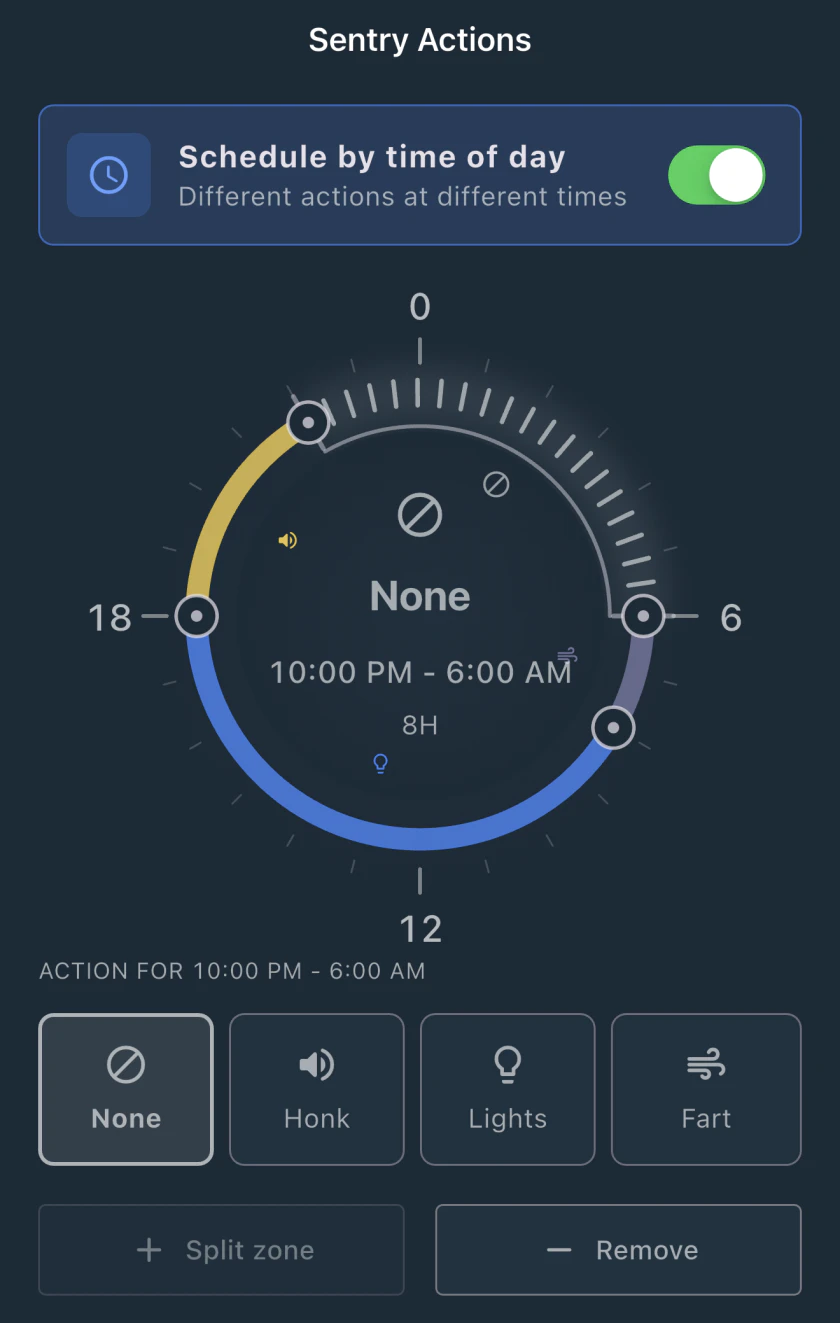
Both are part of a Sentry Pro subscription. They follow Sentry Mode’s status, so they only work while Sentry Mode is on, and only if the car has a connection where it’s parked. When an alert comes in, what to do after a Sentry Mode alert covers the first few minutes.
What Sentry Pro doesn’t do matters just as much here. It doesn’t request your car’s location from Tesla, so it can’t show you where a stolen car is; use the Tesla app for that. It doesn’t alert you when a key is added, when the car is driven or when someone signs in to your Tesla Account. And it can’t lock the car, disable it or stop it being driven. It’s an early warning while the car is parked, not a tracker or an immobilizer.
Frequently Asked Questions
Are Teslas hard to steal?
In US insurance data, yes. HLDI's August 2025 release put the 2022–24 Model 3, Model Y and Model S among the least-stolen vehicles, with theft claim frequencies of 1 to 5 against an all-vehicle average of 100. A Tesla checks for a key before it will drive off, so the routes Tesla and researchers describe are a key left inside, a relayed key signal, an added key, a hijacked Tesla Account or a tow truck. PIN to Drive, a regular look at your key list, a well-protected Tesla Account and Sentry Mode address those.
Can a Tesla be stolen without the key?
It can be towed without one. Driving it off is different: Tesla's manuals say that if the car doesn't detect a phone key, or two minutes have passed since you used the key card, the touchscreen tells you that driving requires authentication. So thieves go after the key: a relayed key signal, a key added without your knowledge or a phone key set up through a hijacked Tesla Account. PIN to Drive stops a relayed key being used to drive, your key list shows any key that's been added, and Sentry Mode reacts to towing.
Can police track a stolen Tesla?
Start with the owner's Tesla app: Tesla's manuals say it can locate the car or track its movement across a map, though location features aren't available in every region. Call the police, share what the app shows and let them recover the car rather than going after it yourself. Sentry Pro doesn't request access to your car's location, so it can't help with this.
Does Sentry Mode stop a Tesla from being stolen?
Not on its own. It can deter a thief and record what happens, but Tesla says not to rely on it for every threat. When it detects a threat or a lot of jerky movement, such as towing, it pulses the headlights, sounds the alarm, alerts you in the Tesla app and saves footage if a USB drive is installed. It watches a locked car in Park; stopping someone who gets in with a relayed key from driving off is PIN to Drive's job.
Can you hotwire a Tesla?
The Tesla theft demonstrations covered here went after the key or the owner's account, not the wiring: researchers relayed a phone key signal, cloned older Model S fobs, added a key, or phished the owner's Tesla Account login. Tesla's manuals say that if the car doesn't detect a key when you press the brake, the touchscreen tells you driving requires authentication. So the defenses that matter are PIN to Drive, a regular look at your key list and care with your Tesla Account login.