Does Tesla Record Inside the Car? Cabin Camera and Sentry Mode
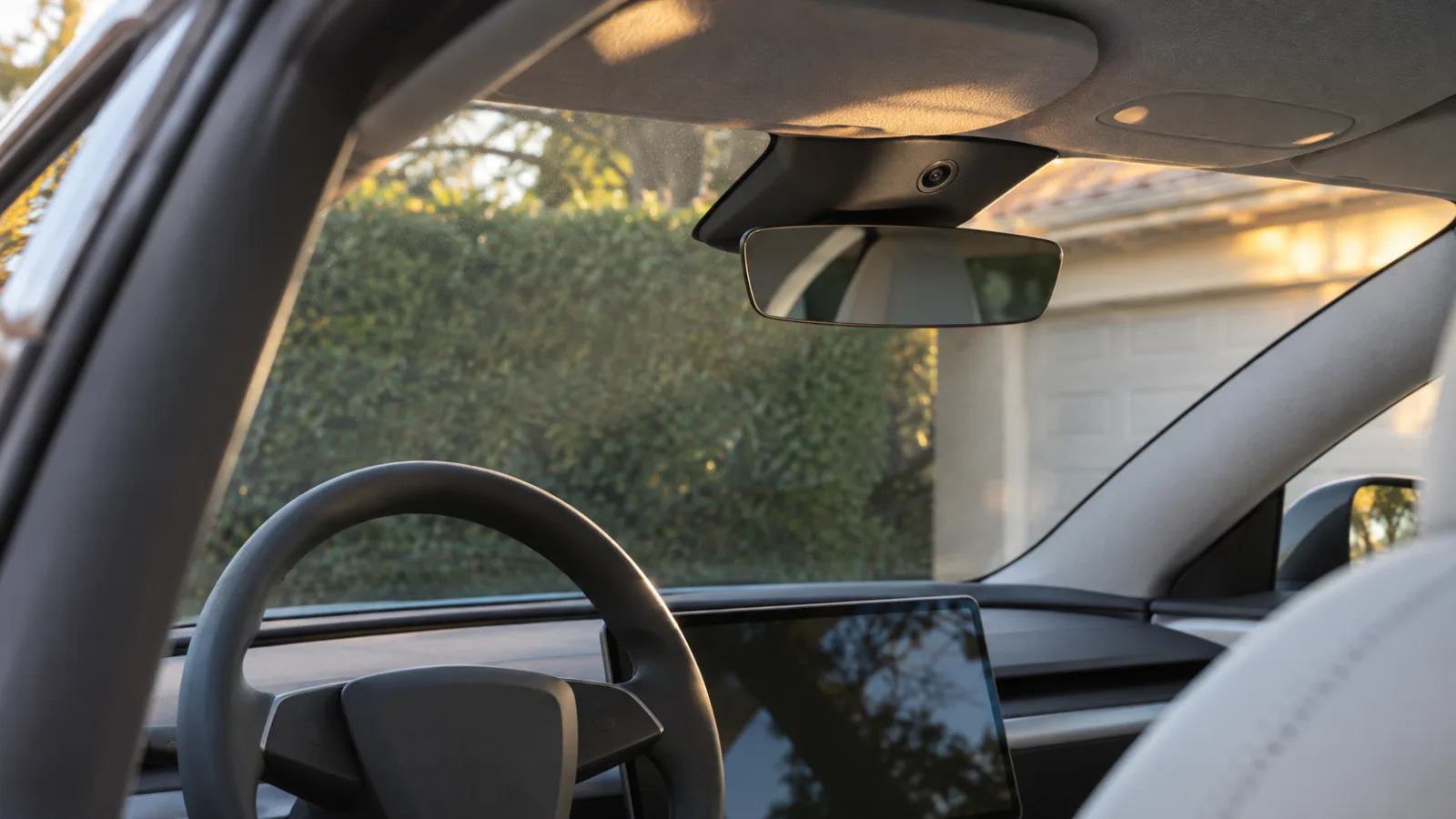
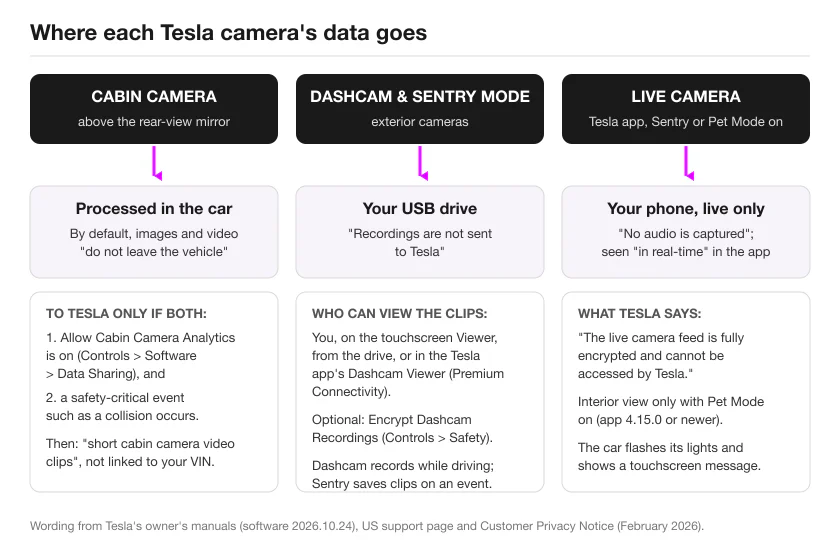
Not by default. The cabin camera above the rear-view mirror is used by a handful of features (driver attentiveness with Full Self-Driving (Supervised), Pet Mode’s live interior view, Zoom calls, Photobooth), and Tesla’s owner’s manual says that by default its “images and video from the camera do not leave the vehicle itself and are not transmitted to anyone, including Tesla”; Tesla’s support page adds that the data “is not saved to onboard memory”. Clips go to Tesla only if you turn on Allow Cabin Camera Analytics and a safety-critical event such as a collision happens. Sentry Mode and Dashcam are a different system: they record the car’s surroundings with the exterior cameras, save to your USB drive, and Tesla says those recordings are not sent to Tesla. The one way to see the inside of a parked Tesla is the Tesla app’s live view with Pet Mode on, which is live only, has no audio and, per Tesla, is encrypted so Tesla cannot access it.
The wording below is Tesla’s own, from its current owner’s manuals (software 2026.10.24), its US support page and its customer privacy notice (updated February 2026).
Which Teslas have a cabin camera and where it is
Tesla’s support page lists the cabin camera for Model S produced in 2021 or later, Model 3, Model X produced in 2021 or later, Model Y and Cybertruck, “located above the rear-view mirror”. The Model 3, Model Y, Model S and Model X manuals each have a Cabin Camera page saying the same; the Cybertruck manual has no Cabin Camera page but describes “a cabin camera, mounted in the rear-view mirror, that monitors driver attentiveness”.
The 2012-2020 Model S and Model X have no cabin camera: their current manual does not mention one anywhere, and Tesla’s support list names Model S and Model X only from 2021.
What the cabin camera is used for
Driver attentiveness. The Full Self-Driving (Supervised) page in the US manuals says: “The cabin camera monitors continued driver attentiveness when Full Self-Driving (Supervised) is engaged. When the cabin camera is actively monitoring driver attentiveness, a green indicator appears in the status bar. This system cannot be disabled.” It works with sunglasses on, and repeated looking away brings a warning. Autosteer “may use cabin camera (if available) to monitor driver hand position on the steering wheel”. The UK and EU manuals describe the same camera under Driver Drowsiness Warning (“This active safety feature utilizes cabin camera to monitor driver attentiveness”) and, in the EU Model Y manual, Advanced Driver Distraction Warning.
Pet Mode and the live interior view. The manual’s climate page: “When Sentry Mode is on, the cameras show a live view of the vehicle’s surroundings. When Pet Mode is on, you can view the inside of the vehicle (requires mobile app version 4.15.0 or higher) as well as get periodic snapshots of your vehicle’s cabin and live updates about cabin conditions (requires mobile app version 4.51.5 or higher and an iPhone with iOS 18+).”
Zoom, Photobooth and HOV routing. “Your vehicle’s cabin camera can be used in calls over Zoom only when Model 3 is Parked”; shift out of Park mid-call and “the cabin camera turns off and you switch to audio only”. The Photobooth app lets you “take selfies using the cabin camera (if equipped)”. In the US manuals, the HOV lane setting on Auto “uses the cabin camera (see Cabin Camera) to determine the number of occupants in the vehicle”; the UK and EU manuals have no such sentence.
To see which features are currently using the camera on your own car: Controls > Software > Cabin Camera.
Does the cabin camera record?
Tesla has three current texts on this, and they are worded differently, so here they are one at a time.
The owner’s manual (Cabin Camera page, all four models with the page, software 2026.10.24): “By default, images and video from the camera do not leave the vehicle itself and are not transmitted to anyone, including Tesla, unless you enable data sharing. If you enable data sharing and a safety critical event occurs (such as a collision), Model 3 shares short cabin camera video clips with Tesla to help us develop future safety enhancements and continuously improve the intelligence of features that rely on the cabin camera. Data may also be shared if diagnostics are required on cabin camera functionality.”
The US support page (Vehicle Safety and Security Features FAQ): “Is Tesla able to see inside my vehicle using cabin camera? No. Cabin camera features are processed directly on the vehicle itself. Image and video data from the cabin camera only leaves your vehicle if data sharing is enabled and a safety event occurs. Otherwise, this data is not saved to onboard memory and is not transmitted to anyone, including us.” The same page answers whether passengers are filmed: “Yes. The entire cabin is captured. It is the driver’s responsibility to inform passengers that cabin camera data sharing is turned on. The cabin camera’s on/off setting do not change with different driver profiles.”
The customer privacy notice (updated February 2026): “Cabin camera is off by default unless enabled by you when using an associated safety or convenience feature.” It goes on: “To improve features that rely on cabin camera, you can choose to opt-in and share Cabin Camera Analytics (Controls > Software > Data Sharing) with Tesla. To protect your privacy, even if you opt-in to sharing this information, this camera data is not associated with your account or VIN.”
Read side by side: the manual covers what leaves the car (nothing, by default), the support page adds that nothing is saved to onboard memory either, and the privacy notice covers when the camera is on at all (when a feature you are using needs it). One of those features cannot be declined: attentiveness monitoring runs whenever Full Self-Driving (Supervised) is engaged.
What Allow Cabin Camera Analytics changes. The toggle is at Controls > Software > Data Sharing > Allow Cabin Camera Analytics, and the manual says “You can change your data sharing settings at any time.” With it off, Tesla’s texts describe no path for cabin images to leave the car. With it on, the manual describes two: “short cabin camera video clips” after a safety-critical event, and data “if diagnostics are required on cabin camera functionality”.
No facial recognition, not linked to your VIN. Manual: “Cabin camera does not perform facial recognition or any other method of identity verification. To protect your privacy, cabin camera data is not associated with your vehicle identification number.” The privacy notice says the shared analytics are “not associated with your account or VIN”.
What Tesla has not published. The manual says “short” cabin camera clips without a length; the 30-second limit in the privacy notice belongs to its Safety Critical Event and Fleet Learning recordings, not to cabin clips. Tesla publishes no retention period for cabin camera data, and the Cabin Camera page says nothing about Sentry Mode, Dashcam, parked recording or audio.
Does Sentry Mode record the inside of the car?
No current Tesla text says it does. The Sentry Mode page in the current manuals describes the feature in terms of the outside of the car: “When enabled, your vehicle’s cameras and sensors (if equipped) remain powered on and ready to record suspicious activity around your vehicle when Model 3 is locked and in Park.” Its Camera-Based Detection setting “uses the vehicle’s external cameras in addition to vehicle sensors to detect a security event while parked”. The privacy notice says Sentry Mode “uses the vehicles sensors and external cameras to detect and notify you when there is suspicious activity or a significant threat to your vehicle while parked”. The word “cabin” does not appear on the Sentry Mode or Dashcam pages, and the Cabin Camera page does not mention Sentry Mode.
The one interior feature attached to Sentry Mode is live viewing. With Sentry Mode on and Pet Mode also on, the Tesla app can “switch the live camera view to see through the interior camera”. That is View Live Camera, which on Model 3, Model Y, Model S and Model X “requires premium connectivity and version 4.2.1 (or newer) of the Tesla mobile app installed on a phone that has been paired as a key”; the interior switch needs app 4.15.0 or newer. While it is in use the car “periodically flashes its exterior lights and displays a message on the touchscreen”. Tesla Sentry Mode live camera covers the live view’s requirements, daily limit and what to check when it isn’t working.
Why older articles say otherwise. In January 2020, Teslarati reported a one-word “Ok” from Elon Musk in reply to a request to let the cabin camera record during Sentry Mode break-ins; no manual or privacy text since describes such a feature. In December 2022, Drive Tesla Canada reported the holiday software update adding a live view through the cabin camera while Sentry Mode or Dog Mode is on, which is the live view described above, not a recording. In January 2023, Not a Tesla App reported a touchscreen preview of the cabin camera feed and a message shown to people in the car when the camera is being viewed remotely; that preview path does not appear in the 2026.10.24 manuals.
Does Tesla record audio?
- Live Camera: the manual says “No audio is captured.” The privacy notice: “Audio from the car’s surroundings is not recorded.”
- Voice commands: “audio voice recordings are not captured, and the transcription of the command is not associated with your account or VIN” (privacy notice).
- Sound detection: an opt-in. The manual: “navigate to Controls > Software > Data Sharing > Allow Sound Detection Analytics. Even if you opt-in to sharing this information with Tesla, sound detection data (recordings up to 60 seconds) are not associated with your account, vehicle, or VIN. When a feature using sound detection is active (including voice commands), an orange indicator appears in the top status bar. It is your responsibility to confirm the consent of occupants in the vehicle.” The privacy notice adds that Tesla “does not capture continuous recordings and does not have live-listening functionality”.
- Dashcam and Sentry clips: Tesla’s Dashcam and Sentry Mode pages describe “video footage” and “footage” and do not say whether saved clips include sound.
- Cabin camera: its manual page says nothing about audio.
Are Tesla cameras always recording?
Dashcam records while driving, when it is on. “Dashcam records video footage of your vehicle’s surroundings while driving.” You choose how footage is saved: Auto (“automatically saves a recording to the USB drive when Model 3 detects a safety-critical event, such as a collision or airbag deployment”), Manual (touch the Dashcam icon to save “the most recent ten minutes of footage”) or On Honk. And: “Model 3 does not record videos when Dashcam is Off.”
Sentry Mode waits for an event. “When enabled, Sentry Mode is idle, ready to sound the alarm and save a recording of the security event if triggered.” When a threat is detected, it “displays a message on the touchscreen that indicates cameras may be recording to inform individuals outside of the vehicles” and “saves footage of the event to a USB drive (if installed)”. With Camera-Based Detection off, “your vehicle only saves clips to the USB drive if a physical threat is detected”. What triggers Sentry Mode walks through the detection settings.
Two kinds of clips can reach Tesla. The privacy notice says “Tesla does not capture continuous recordings or have live-view functionality” and names the exceptions: Safety Critical Event recordings, “automatically captured only if a serious safety critical event occurs such as a vehicle collision or airbag deployment”, up to 30 seconds and associated with your VIN; and Fleet Learning recordings, which “use the vehicle’s external cameras”, need your Data Sharing consent, are limited to 30 seconds and “remain anonymous”.
Who can see the footage
You. Dashcam and Sentry clips are on the USB drive; in Park, the Dashcam icon opens the touchscreen Viewer; and “you can view and share footage from the mobile app by navigating to Security > Dashcam Viewer (View Live Camera from Mobile App must be enabled on the touchscreen). Requires Premium Connectivity.” With Controls > Safety > Encrypt Dashcam Recordings on, “Encrypted clips can only be viewed on the vehicle that recorded them, or by using a Tesla account that was linked to the vehicle when the clips were recorded.” See how to view Sentry Mode clips and the USB drive guide.
Tesla. The manual: “To protect your privacy, video recordings are saved locally to a formatted USB flash drive’s onboard memory. Recordings are not sent to Tesla.” The privacy notice: “Sentry Mode footage is not transmitted to Tesla”, and its table marks Dashcam and Sentry Mode as “Processed directly on the vehicle by default”. For the cabin camera, the three statements above apply. One piece of history belongs here: in April 2023, Reuters reported, from interviews with nine former employees, that recordings from customer cars, including crashes, road-rage incidents and views into garages, had been shared internally between 2019 and 2022, and that the labelling program could show where a recording was made. Tesla did not respond to Reuters’ questions. The privacy notice quoted above is Tesla’s current commitment.
Third-party apps. A telemetry-based alerts app such as Sentry Pro receives state values from the car, not pictures (details in the last section).
Check and change your settings
All on the car’s touchscreen, with Tesla’s labels:
- Controls > Software > Cabin Camera: which features currently use the camera.
- Controls > Software > Data Sharing > Allow Cabin Camera Analytics: whether short cabin clips can be shared with Tesla after a safety-critical event or for diagnostics. The same screen holds Allow Sound Detection Analytics and the other analytics toggles.
- Controls > Safety > Dashcam: on, and the saving mode (Auto, Manual, On Honk). Dashcam must be enabled for Sentry Mode to work.
- Controls > Safety > Encrypt Dashcam Recordings: “Encryption is recommended but optional.”
- Controls > Safety > Sentry Mode: on or off, the Home/Work/Favorites exclusions, Camera-Based Detection, and View Live Camera via Mobile App, the switch behind the live view (interior included, with Pet Mode) and the app’s Dashcam Viewer.
If what you want is to stop the camera seeing the cabin at all, Tesla gives you no setting for that. The manual’s only instruction on the lens is “Keep the camera lens clean and free of obstructions”, and the features that depend on the camera (attentiveness monitoring, Pet Mode’s interior view, Zoom video, Photobooth, HOV occupant counting) need an unobstructed view.
Regional and legal notes
This is a summary of what Tesla and one regulator have published, not legal advice.
- Every current Sentry Mode and Dashcam page opens with the same warning: “It is your sole responsibility to consult and comply with all local regulations and property restrictions regarding the use of cameras.” The privacy notice repeats it for Dashcam: “consult your country’s local laws related to dashcam usage”.
- The UK Model 3 and EU Model Y manuals have the same Cabin Camera page as the US ones, with “Assisted Driving” in place of “Self-Driving”, and the same Allow Cabin Camera Analytics path. They have no Full Self-Driving (Supervised) attentiveness paragraph and no HOV occupant sentence; the camera’s driving use there sits under Driver Drowsiness Warning and, in the EU manual, Advanced Driver Distraction Warning.
- The China-market Model Y manual (English edition) is shorter: “Images and video from the camera do not leave the vehicle itself and are not transmitted to anyone, including Tesla.” It has no data-sharing clause and no Allow Cabin Camera Analytics path.
- In February 2023 the Dutch Data Protection Authority closed an investigation into Sentry Mode (the external cameras, not the cabin camera). It said that where the cameras had “continuously filmed everything around the parked vehicle” with images “saved for one hour”, Tesla’s software updates meant “the cameras are now disabled by default”, the car “responds only if the vehicle is touched”, and the default saved footage is the last minute, adjustable to a maximum of ten minutes. No fine was issued, because, the DPA said, “it is not Tesla but the vehicles’ owners who are legally responsible for the images that their cars record.” The current EU Model Y manual does not state a default for Camera-Based Detection, so check your own car.
What this means for Sentry Pro alerts
Sentry Pro does not see, store or forward any camera. As the app is built, it subscribes to a short list of vehicle fields through Tesla’s Fleet Telemetry: the Sentry Mode state, lock state, software version and vehicle name, plus charge state and battery level for app versions that still display them. An alert is a change in the Sentry Mode state the car reports: “Activity detected” when the car reports Sentry Mode activity, “Alarm triggered” when it reports the alarm. No image, video, audio or footage is requested, received or stored, and the app has no video player or live view.
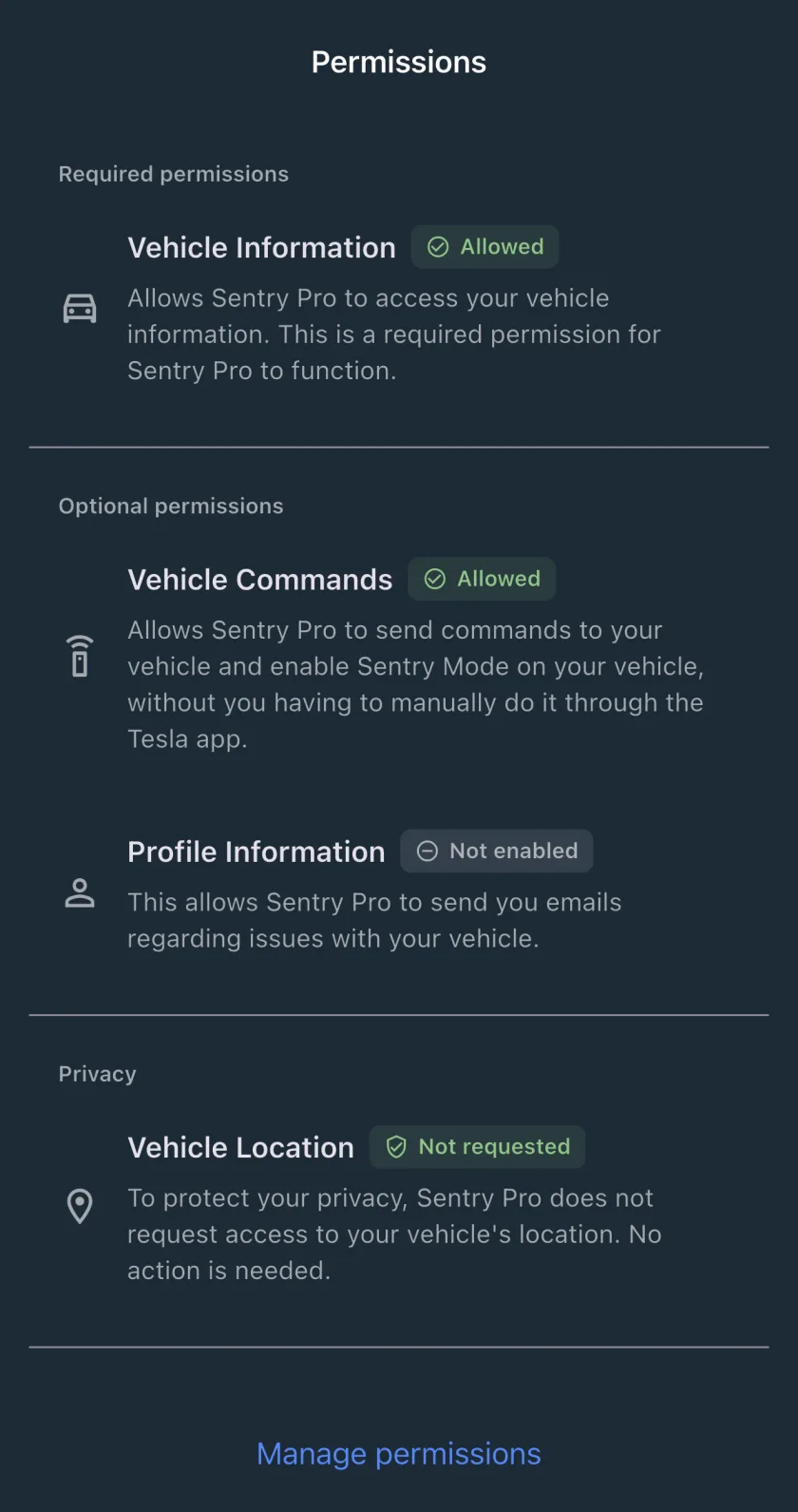
The permissions it asks for in your Tesla account are Vehicle Information (required), Vehicle Commands (optional, to turn Sentry Mode on for you) and Profile Information (optional, for emails about problems with your car). Vehicle Location is not requested.
If an alert makes you want to look, the picture comes from Tesla: open the Tesla app and use View Live Camera (exterior, or interior with Pet Mode on). What to do after a Sentry Mode alert covers that decision, does Tesla notify you of Sentry Mode events explains how the two apps’ alerts differ, and our FAQ has the details on permissions and privacy and why Sentry Pro saves no video.
Sources: Tesla owner’s manuals for Model 3, Model Y, Model S, Model X, Cybertruck and 2012-2020 Model S (software 2026.10.24), including the Cabin Camera page; Tesla’s Vehicle Safety and Security Features support page; Tesla’s Customer Privacy Notice (updated February 2026); the Dutch DPA’s statement of 22 February 2023.
Frequently Asked Questions
Does a Tesla record inside the car while it is parked?
No, according to Tesla's current texts. The Sentry Mode page says the car's 'cameras and sensors (if equipped) remain powered on and ready to record suspicious activity around your vehicle', and Tesla's privacy notice says Sentry Mode 'uses the vehicles sensors and external cameras'. The only interior access tied to Sentry Mode is live viewing in the Tesla app when Pet Mode is also on, and the manual says 'No audio is captured. The live camera feed is fully encrypted and cannot be accessed by Tesla.'
Can Tesla employees watch my cabin camera?
Tesla says no. Its support page answers 'Is Tesla able to see inside my vehicle using cabin camera?' with 'No. Cabin camera features are processed directly on the vehicle itself. Image and video data from the cabin camera only leaves your vehicle if data sharing is enabled and a safety event occurs.' The manual says clips shared that way are 'short cabin camera video clips' and that cabin camera data 'is not associated with your vehicle identification number'. Separately, a 2023 Reuters report described former employees sharing recordings from customer cars between 2019 and 2022; Tesla's privacy notice today says Dashcam and Sentry footage is not transmitted to Tesla.
Does Sentry Mode use the interior camera?
Not for recording, according to Tesla's current owner's manuals and privacy notice: both describe Sentry Mode in terms of the external cameras and sensors, and neither page mentions the cabin camera. What exists is a live view: with Sentry Mode and Pet Mode both on, the Tesla app can 'switch the live camera view to see through the interior camera' (app 4.15.0 or newer; View Live Camera needs Premium Connectivity on Model 3, Y, S and X).
Does the Tesla cabin camera record audio?
Tesla says no for the live camera ('No audio is captured') and for voice commands ('audio voice recordings are not captured'). The car's microphone is covered by a separate opt-in, Allow Sound Detection Analytics, which can share recordings of up to 60 seconds that are 'not associated with your account, vehicle, or VIN'. The Cabin Camera page itself says nothing about audio, and Tesla's Dashcam and Sentry Mode pages do not say whether saved clips include sound.
Can I turn the cabin camera off or cover it?
There is no single off switch in Tesla's manuals. Controls > Software > Cabin Camera shows which features are using it, and Controls > Software > Data Sharing > Allow Cabin Camera Analytics controls whether clips can be shared with Tesla. While Full Self-Driving (Supervised) is engaged, the manual says attentiveness monitoring 'cannot be disabled'. On covering it, the manual's only instruction is to 'keep the camera lens clean and free of obstructions', and the attentiveness, Pet Mode and Zoom features all depend on the camera seeing the cabin.