Is Tesla Sentry Mode Free? What Premium Connectivity Adds
Yes. Sentry Mode comes standard on new Teslas, and you don’t need a subscription to use it. The car watches its surroundings, sounds the alarm and records to a USB drive on its own. The only thing you might have to buy is the drive, and many cars already have one in the glove box.
Premium Connectivity, Tesla’s paid data plan, adds remote viewing: View Live Camera and the Dashcam Viewer in the Tesla app. In the US it costs $9.99 a month or $99 a year plus tax, according to Tesla’s connectivity page on October 28, 2026. Prices can change, and the Tesla app shows the current price for your car.
What Sentry Mode costs, level by level
| What you pay | What you get |
|---|---|
| Nothing | Detection, alarm and lights, a touchscreen warning, clip review in the car |
| A USB drive, once, if your car didn’t come with one | Sentry recordings |
| Premium Connectivity: $9.99/month or $99/year plus tax (US) | View Live Camera and the Dashcam Viewer in the Tesla app |
| Sentry Pro, optional: subscription or one-time lifetime purchase | Activity alerts, automatic honk or lights, a Sentry schedule |
What you get without paying extra
Tesla’s Model 3 and Model Y owner’s manuals describe the same core behavior. When Sentry Mode is on and the car is locked and in Park:
- On a threat, or heavy jerky movement such as towing, the car pulses the headlights, sounds the alarm, shows a touchscreen message that cameras may be recording, and saves the footage to the USB drive.
- The Tesla app alerts you only when the alarm goes off, someone tries a door or trunk, or the car detects sudden jerky motion. If the car doesn’t consider an event a clear threat, it records footage without sounding the alarm.
- You can review clips in the car. With the car in Park, open Dashcam from the app launcher. You can also plug the drive into a computer.
- You can skip familiar places. Sentry Mode can be set not to turn on automatically at Home, Work or Favorites, if the car is parked within about 500 m (1,640 ft) of the saved location.
Sentry Mode is off by default, and depending on region, configuration and software, some cars may not have it. The running cost is electricity: Tesla notes that power use may increase while it’s on, and Sentry Mode turns off if the car enters Low Power Mode. Our Sentry Mode guide covers setup.
The one-time cost: a USB drive
Sentry Mode needs a properly formatted USB drive to record, and Dashcam must be enabled. Cars built from about 2020 on come with a pre-formatted drive in the glove box. If you buy one, Tesla’s requirements are:
- At least 64 GB. Larger is better.
- A sustained write speed of at least 4 MB/s.
- USB 2.0 compatible.
- Formatted by the car (Controls > Safety > Format USB Drive) or on a computer as exFAT, FAT, ext3 or ext4.
Use the glove box USB port if your car has one. Without a drive, Sentry Mode still alerts you through the app but records nothing. When the drive runs low on space, the oldest Sentry clips are deleted to make room, so save the footage soon after an incident.
What Premium Connectivity adds for Sentry Mode
Tesla’s connectivity table lists three camera features as Premium-only. Detection, the alarm and recording aren’t among them, and the owner’s manual ties recording to the USB drive, not to a plan.
| Feature | Without Premium | With Premium |
|---|---|---|
| Detection, alarm and recording to USB | Yes | Yes |
| Reviewing clips on the touchscreen or a computer | Yes | Yes |
| Sentry Mode View Live Camera | No | Yes |
| Dashcam Viewer in the Tesla app | No | Yes |
| Pet Mode live cabin camera | No | Yes |
View Live Camera has limits of its own:
- It needs Tesla app 4.2.1 or newer on a phone paired as a key, and you have to allow it in the car under Controls > Safety > Sentry Mode > View Live Camera via Mobile App.
- Viewing is capped at about one hour a day in total, or 15 minutes in some regions.
- The car flashes its exterior lights and shows a touchscreen message while you’re watching.
- It isn’t available on Model S and Model X vehicles built from 2012 to 2020.
Premium Connectivity also covers features outside Sentry Mode, such as live traffic maps, satellite-view maps and music streaming over cellular, so weigh those too.
Does Sentry Mode work without Premium Connectivity?
Yes, in the car. Without Premium you lose the phone-side viewing in the table above, so you review footage in the car or on a computer instead.
Every Tesla also includes Standard Connectivity at no cost for eight years from first delivery, or for the life of the car if it was ordered new on or before July 20, 2022. Tesla says that once Standard Connectivity ends, some connectivity features may be changed or removed. It doesn’t say which Sentry features, if any, are affected.
Anything that has to reach your phone also depends on the car having signal where it’s parked. If you often park underground, see what Sentry Mode still does without signal.
How to check what your car has
- In the Tesla app: go to Upgrades > Manage. Premium Connectivity appears under Active if you have it. Cars with lifetime Premium show Free Premium Connectivity. Tap Premium Connectivity to see when a trial ends.
- On the touchscreen: go to Controls > Software and look for Premium Connectivity.
Tesla says new Model S, Model 3, Model X, Model Y and Cybertruck orders receive a Premium Connectivity trial at delivery. If live camera viewing works on your new car today, check the trial’s end date before you count on it.
Where a third-party alert app fits
The Tesla app alerts you to alarms, door or trunk attempts and sudden jerky motion. If you also want to know when Sentry Mode picks up other activity near the car, that’s the gap an alert app like Sentry Pro fills. With an active Sentry Pro subscription or trial, you get:
- Activity alerts when Sentry Mode detects something near the car, as well as alarm alerts.
- Sentry Actions that make the car honk or flash its lights automatically when Sentry Mode is triggered.
- A schedule that turns Sentry Mode on and off at set times every day.
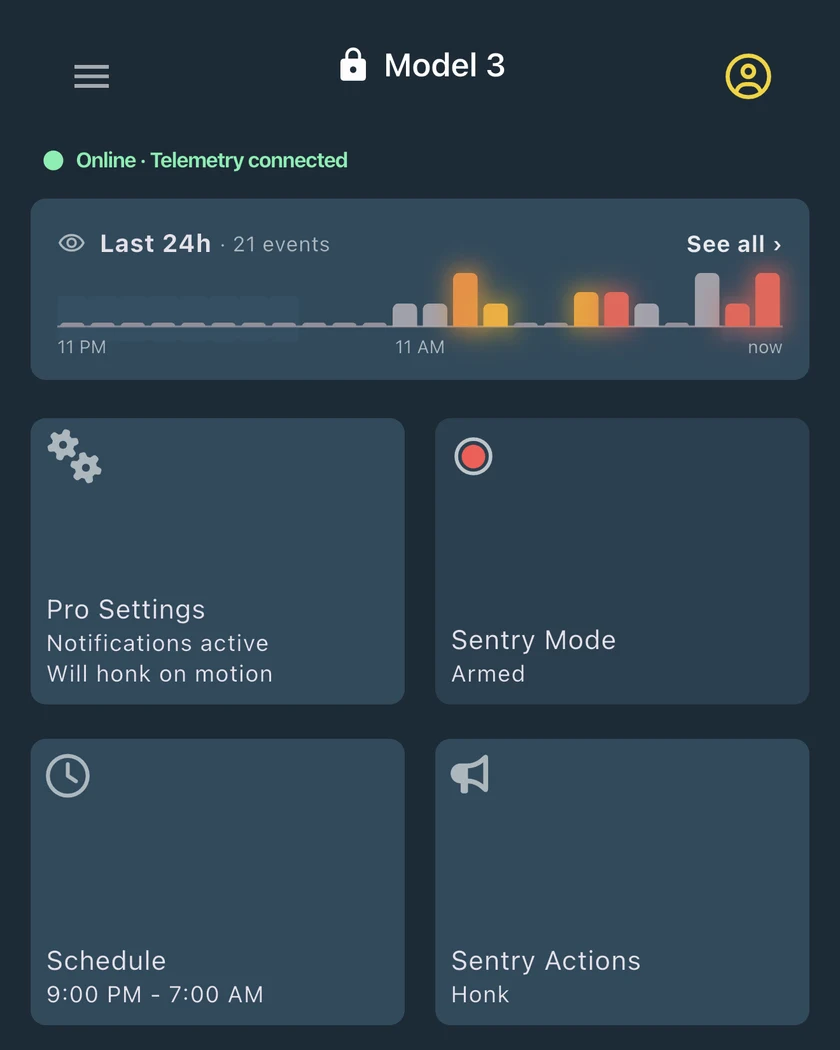
Sentry Pro doesn’t require Premium Connectivity, and it doesn’t show video. Tapping an alert opens the Tesla app, where View Live Camera and the Dashcam Viewer still need Premium.
Sentry Pro is free to download. The features above need a monthly or yearly subscription or a one-time lifetime purchase, and Sentry Pro offers a free trial. See current prices. Without an active subscription or trial, these features are locked in the app and a schedule won’t run. If a subscription lapses, the schedule switches itself off at its next run and sends you a notification, and alerts and Sentry Actions stop within a few days.
So what should you pay for?
- Nothing, if you mainly want the deterrent and are happy to review clips in the car later.
- A bigger USB drive, if you park for long stretches and want room for more Sentry clips before the oldest are deleted.
- Premium Connectivity, if you want to check the cameras live or browse clips from your phone, or you want its other features.
- An alert app, if you want alerts for activity that doesn’t set off the alarm, or want Sentry Mode to follow a schedule.
Frequently Asked Questions
Do I need Premium Connectivity to get Sentry Mode alerts in the Tesla app?
Tesla doesn't list them as a Premium feature. Its support page and owner's manual describe the Tesla app's alarm alert as part of Sentry Mode, which comes standard on new Teslas, and the camera features in Tesla's Premium Connectivity table are all for viewing video. Tesla doesn't say what happens to these alerts after a car's included Standard Connectivity period ends.
If I cancel Premium Connectivity, does Sentry Mode stop working?
No. Detection, the alarm and recording to the USB drive aren't Premium features. You keep Premium features until the end of the billing period you've paid for, then lose View Live Camera and the Dashcam Viewer in the Tesla app. Tesla doesn't prorate or refund the rest of the period. You can cancel in the Tesla app under Upgrades > Manage.
Does a used Tesla come with Premium Connectivity?
Sometimes. Some older cars have Premium Connectivity for life, which the Tesla app shows as Free Premium Connectivity under Upgrades > Manage. If you bought the car privately or through a third party and ownership transferred on or after January 21, 2020, and it has neither lifetime Premium nor an active trial, Tesla gives a 30-day trial. It starts on the day ownership transfers, and you need to claim the car in the Tesla app.