Which Cameras Does Tesla Sentry Mode Record? By Model and Hardware
Sentry Mode saves the view from four or six of your Tesla’s exterior cameras: never all of them, and never the cabin camera. Tesla’s current owner’s manuals for Model 3, Model Y, Model S and Model X (2021 onward) and Cybertruck say “Six videos are recorded for each saved clip, one from each camera (front, rear, left, right, left pillar, and right pillar).” The manuals for the 2012–2020 Model S and Model X say four: front, rear, left and right. What the manuals leave out is that the two pillar views also depend on the car’s computer.
Short answer: four or six exterior views, never the cabin
- Six views (front, rear, left, right, left pillar, right pillar): Model 3, Model Y, and 2021-onward Model S and Model X with HW4 on software 2025.14 or later; Cybertruck.
- Four views (front, rear, left, right): the same models with HW3. The 2012–2020 Model S and Model X save four at most, and the rear view only if the car was built after about February 2018.
- Never saved: the cabin camera, and at least one forward-facing camera on every model, because Tesla’s list has a single front view.
What your Tesla records, model by model
| Car | Views per saved clip (Tesla’s manual) | Pillar views actually saved | Rear view | Live view in the Tesla app |
|---|---|---|---|---|
| Model 3, Model Y, Model S and Model X (2021 onward) | Six | HW4 cars on software 2025.14 or later; not HW3 cars | Yes (Model 3: if built after about February 2018) | Yes, with Premium Connectivity; not on Self-Driving computer 2.0 or 2.5 |
| Cybertruck | Six | Yes, since around October 2025 | Yes, from the tailgate camera | Yes |
| Model S and Model X (2012–2020) | Four (front, rear, left, right) | No | Only on cars built after about February 2018 | No |
The manuals don’t separate hardware generations. The pillar condition comes from Tesla’s release notes for software 2025.14, as reproduced by Not a Tesla App: “Your vehicle’s side cameras (B-Pillar) will now be recorded to both Dashcam and Sentry clips,” listed for HW4 Model S, 3, X and Y. The same page says HW3 cars did not get it, and Drive Tesla Canada reported the same split. So a HW3 car whose manual says six still saves four.
Cybertruck was left out of that update. In October 2025, Drive Tesla Canada reported that Cybertruck Sentry and Dashcam clips had gained the pillar views, and the truck’s current manual lists the same six views as the other models. The Cybertruck Sentry Mode guide covers the rest of the truck’s setup.
What front, rear, left, right and pillar mean
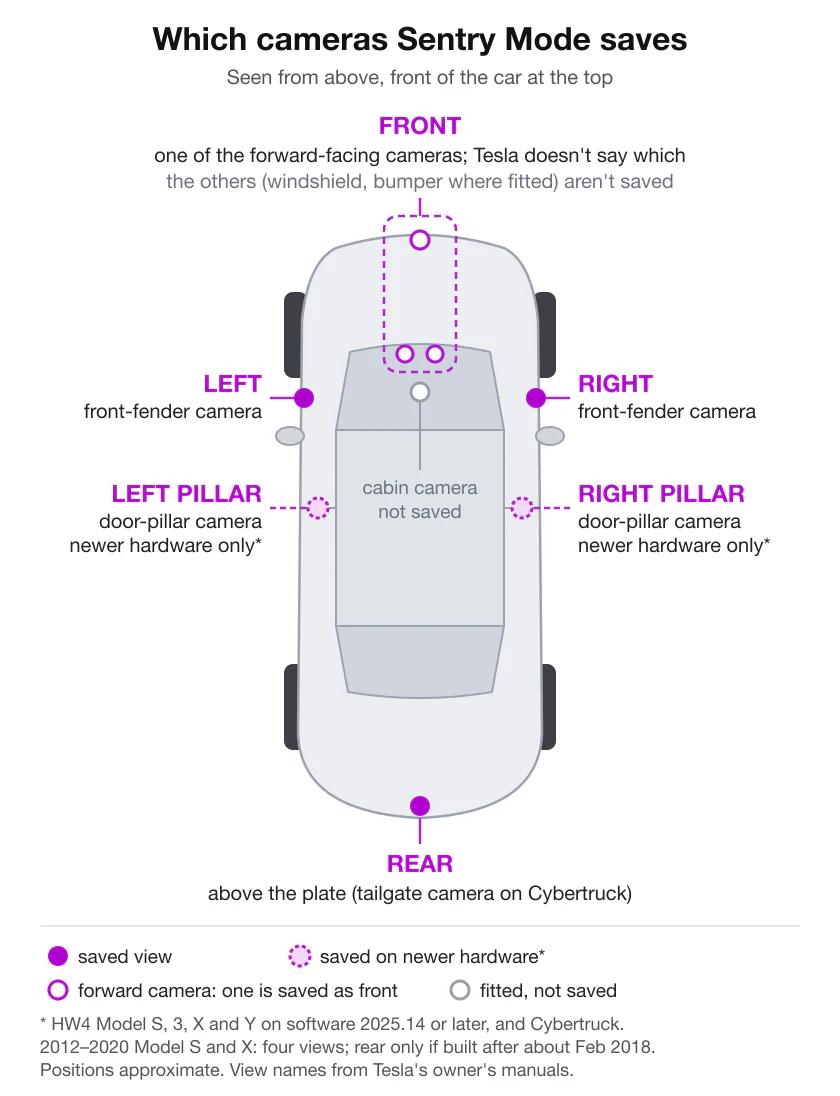
Tesla names the views but not the cameras behind them. Matched against the camera list on each model’s Cameras page:
- Front: one of the forward-facing cameras. Current models have two on the windshield above the rear-view mirror (the 2012–2020 Model S and Model X have three), and the current manuals add a front bumper camera on Model Y, Model S, Model X and Cybertruck, and on Model 3 “if equipped”. Tesla doesn’t say which camera supplies the front view.
- Left and right: the camera on each front fender (above each front wheel on Cybertruck), which Tesla also calls side repeater cameras.
- Left pillar and right pillar: the camera in each door pillar, between the front and rear doors.
- Rear: the camera above the rear license plate, or on the tailgate on Cybertruck.
Cameras your car has that Sentry Mode doesn’t save
- The other forward-facing cameras. With one front view per clip, the rest of the forward cameras, one or two depending on the car, are never in the recording.
- The pillar cameras on HW3 cars and on 2012–2020 Model S and Model X. Tesla lists a camera in each door pillar on every model, but these cars don’t save those views.
- The cabin camera. Model 3, Model Y, 2021-onward Model S and Model X, and Cybertruck have one above the rear-view mirror; the 2012–2020 cars don’t. It isn’t among the saved views, and the word “cabin” doesn’t appear on Tesla’s Sentry Mode, Dashcam or USB recording pages. The only way to see inside through Sentry Mode is live, in the Tesla app with Pet Mode also on. Does Tesla record inside the car? covers what the cabin camera is used for, who can see its images and what Tesla says about sound.
Why your clips only show four cameras
An event folder usually holds several short files for each camera, so count the camera names in the file names, not the files. If you find four, check these in order:
- An older Model S or Model X. On a 2012–2020 car, four is the maximum, and the rear view needs a build date after about February 2018. Sentry Mode on older Model S and Model X covers what these cars can and can’t do.
- The car’s computer. On Model 3, Model Y and 2021-onward Model S and Model X, the pillar views went to HW4 cars only. Tesla’s manual: “Touch Controls > Software and look at Self-Driving Computer to find out which computer your vehicle has.” A HW3 car stays at four, whatever the manual says.
- The software version. A HW4 car needs 2025.14 or later. Controls > Software is also where you view and install updates.
- Old Cybertruck clips. Footage saved before pillar recording reached the truck, around October 2025, has four views.
A view that is there but useless is a different problem. Tesla warns that a dirty or obstructed lens reduces camera performance and that “Condensation can form inside the camera enclosures”, especially when the car is parked outside in cold or wet weather. Clean every camera, the pillars included; the Sentry Mode troubleshooting guide covers camera errors and missed events.
Cameras as triggers: Camera-Based Detection
The cameras do two jobs. They record, and with Camera-Based Detection on they also help decide what counts as an event. Tesla’s manual: “When Camera-Based Detection is enabled, Sentry Mode uses the vehicle’s external cameras in addition to vehicle sensors to detect a security event while parked. If disabled, your vehicle only saves clips to the USB drive if a physical threat is detected.” The switch is at Controls > Safety > Sentry Mode > Camera-Based Detection, and it appears in every current manual, 2012–2020 Model S and Model X included. It changes when a clip is saved, not which views a clip contains.
Keep it on where people can walk up to the car, such as the street or a public car park: with it off, someone who lingers but never touches the car leaves no clip. Turn it off if passers-by fill the drive with clips you never watch; you keep clips of physical threats. What triggers Sentry Mode walks through the detection settings.
Which cameras you can watch live
View Live Camera in the Tesla app shows “the area surrounding” the car “as seen through the exterior cameras” while Sentry Mode is on. Tesla’s manual describes gray circles in the app that correspond to different cameras, and with Pet Mode also on, you can switch to the interior camera. It is live only: Tesla says “No audio is captured”, and use is capped at about an hour a day (15 minutes in some regions). On Model 3, Model Y, Model S and Model X it needs Premium Connectivity and isn’t supported on Self-Driving computer 2.0 or 2.5; the 2012–2020 Model S and Model X don’t have it. Tesla Sentry Mode live camera covers setup and what to check when it won’t load.
Finding the camera that caught it
- Start from a time. Use the alert time, or the window between parking and coming back. On the touchscreen, Tesla says “The list of video clips is organized by location and timestamp”; the Tesla app’s Dashcam Viewer needs Premium Connectivity.
- Open the event. On the USB drive, Sentry events are in TeslaCam > SentryClips, usually one folder per event named with its date and time, holding the files for each camera with the camera in the name.
- Start with the side that matters. Left and left pillar for the car’s left side, right and right pillar for its right, front or rear for the ends; then check the other views for the same minutes.
- Copy the whole folder. Keep every camera’s files together and work on the copy. Saving Sentry Mode footage after an incident has the steps, how to view Sentry Mode clips covers the car, the app and a computer, and the USB drive guide explains how long clips last before the car overwrites them.
Where Sentry Pro fits
Sentry Pro can’t show you any of these cameras. It receives the Sentry Mode state the car reports through Tesla’s Fleet Telemetry: when that state shows activity around the car, it sends an Activity detected alert; when it shows the alarm, Alarm triggered. The state carries no image, video or camera name, and Sentry Pro requests none, so neither its alerts nor its Activity list can say which camera saw something.
What it gives you is a time. Its alerts cover the activity the car reports as well as alarms, while Tesla’s app notifies you only for an alarm, a door or trunk attempt or sudden jerky motion (how the two compare). Take the time to the clip list or the SentryClips folder, find the event, then open the views on the side that matters.
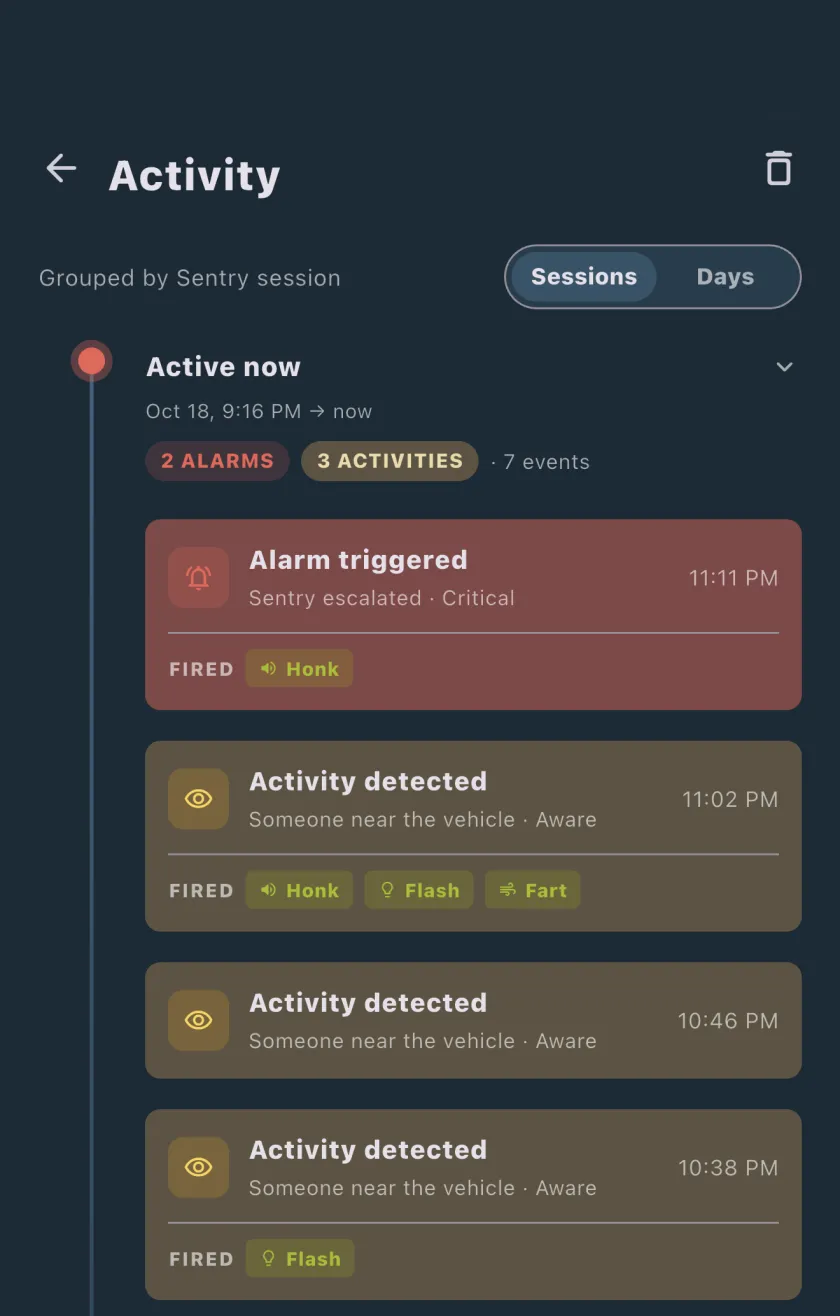
Tapping a Sentry Pro alert, on iPhone or Android, opens the Tesla app rather than a particular clip; from there, View Live Camera and the Dashcam Viewer are Tesla’s features. Alerts, and the alarm and activity entries in the Activity list, need a Sentry Pro subscription or trial.
Frequently Asked Questions
Does Sentry Mode record all of my Tesla's cameras?
No. Tesla's current manuals for Model 3, Model Y, Model S and Model X (2021 onward) and Cybertruck say each saved clip has six videos, one each from the front, rear, left, right, left pillar and right pillar views; the 2012-2020 Model S and Model X manuals say four (front, rear, left and right). The cabin camera is never one of them, and because there is only one front view, at least one of the car's forward-facing cameras is always left out. On Model 3, Model Y and 2021-onward Model S and Model X, the two pillar views also depend on hardware: they came with software 2025.14 for HW4 cars only, according to Not a Tesla App's copy of Tesla's release notes and to Drive Tesla Canada.
Does Sentry Mode use the B-pillar cameras?
On newer hardware, yes. Tesla's release notes for software 2025.14, as reproduced by Not a Tesla App, say the side (B-pillar) cameras will now be recorded to both Dashcam and Sentry clips. Not a Tesla App lists that note for HW4 Model S, 3, X and Y and says HW3 cars did not get it; Drive Tesla Canada reported the same. Cybertruck began saving its pillar views around October 2025, according to Drive Tesla Canada, and its current manual lists left pillar and right pillar among its six views. The 2012-2020 Model S and Model X have door-pillar cameras but save only front, rear, left and right.
Why does my Tesla only save four Sentry videos?
It comes down to the car's computer, software or age. On Model 3, Model Y and 2021-onward Model S and Model X, the left and right pillar views came with software 2025.14 for HW4 cars only, so HW3 cars save front, rear, left and right even though the manual lists six. A HW4 car on older software saves four until it updates. The 2012-2020 Model S and Model X save four at most, with the rear view only on cars built after about February 2018, and Cybertruck clips saved before about October 2025 have four. To see which computer your car has, Tesla says to touch Controls > Software and look at Self-Driving Computer.
Does Sentry Mode record the inside of the car?
Not according to Tesla's manuals. The cabin camera isn't among the views Tesla lists for a saved clip (front, rear, left, right and, on newer cars, left and right pillar), and the word cabin doesn't appear on the Sentry Mode, Dashcam or USB recording pages of Tesla's manuals. The one interior feature is live viewing: with Sentry Mode and Pet Mode both on, the Tesla app's View Live Camera can switch to the interior camera, and Tesla says no audio is captured.
How many cameras does the Cybertruck record in Sentry Mode?
Six. The current Cybertruck owner's manual says six videos are recorded for each saved clip: front, rear, left, right, left pillar and right pillar. The truck has more cameras than that. Its Cameras page lists eight on the outside (one on the tailgate, one in each door pillar, two on the windshield, one above each front wheel and one on the front bumper) and a cabin camera above the rear-view mirror. The pillar views reached Cybertruck around October 2025, according to Drive Tesla Canada, so older clips may have four.
Can Sentry Pro tell me which camera saw something?
No. Sentry Pro receives the Sentry Mode state your Tesla reports through Tesla's Fleet Telemetry, such as activity around the car or a triggered alarm, and that state doesn't name a camera. It receives no images or video. What it gives you is the time of each activity and alarm in its Activity list, which you can take to Tesla's Dashcam Viewer or the SentryClips folder on the USB drive to find the event, then open the views on the side that matters. Tapping a Sentry Pro alert opens the Tesla app.