
What Triggers Tesla Sentry Mode? Alarms, Clips and False Triggers
Tesla’s owner’s manuals describe two things that set off Sentry Mode’s full reaction while the car is locked and in Park: a threat it detects around the car, and a lot of jerky movement, such as the car being towed or shaken. The headlights pulse, the alarm sounds, the touchscreen shows a message that cameras may be recording, the Tesla app alerts you, and the clip is saved to the USB drive if one is installed. Someone trying to open a door or trunk also sends a Tesla app notification. Anything Sentry Mode doesn’t consider a clear threat is recorded without the alarm and without a notification. Tesla publishes no thresholds; the manuals only say Sentry Mode “uses many factors to determine whether to activate the security alarm.”
What sets off Sentry Mode, and what the car does
| What happens | What the car does | Tesla app notification |
|---|---|---|
| Sentry Mode detects a threat | Pulses the headlights, sounds the alarm, shows a touchscreen message that cameras may be recording, saves the clip to a USB drive if installed | Yes, an alert about the alarm |
| A lot of jerky movement, such as towing or shaking | The same full reaction | Yes |
| Someone tries to open a door or trunk | Tesla doesn’t describe a separate reaction | Yes |
| Anything Sentry Mode doesn’t consider a clear threat | Records footage; no alarm | No |
Tesla’s current manuals for the Model 3, Model Y, Model S, Model X, Cybertruck and 2012-2020 Model S, including the UK and EU English editions, word these rules the same way. For exactly which events reach your phone, see does Tesla notify you of Sentry Mode events.
What “Sentry activated” means
“Sentry activated” isn’t a phrase Tesla’s manuals use. People usually mean Sentry Mode went off: the lights pulsed, the alarm sounded or a notification arrived. Tesla’s own description is that the car “displays a message on the touchscreen that indicates cameras may be recording to inform individuals outside of the vehicles” and “alerts you of the alarm on the mobile app.”
Two states are worth keeping apart:
- On, and waiting. Sentry Mode is enabled and, in the manual’s words, idle, “ready to sound the alarm and save a recording of the security event if triggered.” Its icon is red while it’s on.
- Triggered. Something set it off and the car reacted as in the table above.
If your Sentry Mode keeps switching itself on or off rather than going off, that’s a different problem: see Sentry Mode not working or keeps turning off.
Sentry Mode, the Security Alarm and Tilt/Intrusion are different
Teslas also have a conventional security system, and it explains some of the noise owners hear:
- Security Alarm. If a locked door or trunk is opened and the car doesn’t detect your key, an alarm sounds and the headlights and turn signals flash. With Security Alarm on (Controls > Safety > Security Alarm), the car arms it a minute after you get out, once the doors are locked and your key is no longer detected. While Sentry Mode is on, this setting isn’t available.
- Siren and Tilt/Intrusion. On Model 3, Model Y, Model S and Model X, a battery-backed siren (if equipped) sounds in the same situation. Turn on Tilt/Intrusion (if equipped) and it also sounds when the car detects motion inside the cabin.
- Model S and Model X with the Enhanced Anti-Theft upgrade. The horn sounds as well, and with Tilt/Intrusion on (Controls > Safety > Tilt/Intrusion) it also sounds if the car detects motion inside the cabin or is moved or tilted, for example by a tow truck or jack. The 2012-2020 Model S manual says the same.
- Cybertruck. The manual calls Sentry Mode and the alarm system “two separate things.” The alarm works like other vehicles’ (a siren sounds when a locked door is opened), while Sentry Mode “uses cameras and audio to detect suspicious activity nearby.” When the security system goes off, the siren sounds, the headlights and turn signals flash, and the app tells you the security alarm is triggered.
- UK and Europe. The UK Model 3 and EU Model Y manuals add that, depending on the market, your car “may not have an audible alarm for security features, or the features may not operate exactly as described.”
Sentry Mode can only sound the alarm while it’s on, so an alarm with Sentry Mode off came from the security system. For how Tesla’s approach compares with an ordinary car alarm, see Sentry Mode vs traditional car alarms.
Why it can go off for nothing
Tesla doesn’t explain how Sentry Mode decides what counts as a threat. Its manuals only say it “uses many factors,” and they describe no sensitivity setting and nothing about rain or weather. Not a Tesla App reported in 2020 that a sensitivity adjustment was coming; none of the current manuals describes one.
Reports from outside Tesla fill the gap. Not a Tesla App’s coverage of the 2022.44.2 update noted that rain, or parking on a busy street with a lot of foot traffic, can produce dozens of recordings with no threat at all. A clip without an alarm is the record-only bottom row of the table. A full alarm you can’t explain is worth a look at the footage; how to view Sentry Mode clips covers the touchscreen, app and computer routes.
What you can change
You can’t tune what Sentry Mode notices, but Tesla documents a few levers:
- Camera-Based Detection. With it on, Sentry Mode uses the external cameras as well as the vehicle sensors to detect a security event. Turn it off (Controls > Safety > Sentry Mode > Camera-Based Detection) and the car “only saves clips to the USB drive if a physical threat is detected.” Not a Tesla App’s coverage of the 2022.44.2 update describes those as intrusion events such as glass breaking, a door opening or, in some markets, the tilt sensor. Expect fewer clips of people simply walking past; the trade-off is no clip of someone who lingers without touching the car.
- Disable Sentry Sounds. Controls > Safety > Disable Sentry Sounds silences the alarm and the audio system when the alarm is triggered, and Sentry Mode “still sends a notification through the mobile app and saves the last 10 minutes of footage.” It changes the noise, not what sets Sentry Mode off. That’s how Tesla’s US manuals describe it; the UK Model 3 and EU Model Y manuals mention the setting only in connection with Pet Mode, and the 2012-2020 Model S manual doesn’t mention it.
- Pet Mode. If Pet Mode and Sentry Mode are on together, “Sentry defaults to Disable Sentry Sounds to protect your pet.”
- Where it switches on. Exclude Home, Exclude Work and Exclude Favorites stop Sentry Mode switching on automatically at those places (within about 500 meters of the saved location). Sentry Mode at home helps you decide whether to use them.
- A USB drive. Without one, a security event still reaches the Tesla app but nothing is recorded, so you can’t check what set it off. See which USB drive Sentry Mode needs.
If the alarm is going off right now, what to do after a Sentry Mode alert covers checking the cameras and stopping a false alarm.
Alerts for activity as well as alarms (Sentry Pro)
Sentry Pro reads the Sentry Mode state your car reports through Tesla’s Fleet Telemetry. Tesla’s developer data distinguishes an Aware state from a Panic state, and Sentry Pro turns them into two kinds of alert, each followed by your car’s name:
- “Activity detected around…” when the car reports Aware (or Quiet).
- “Alarm triggered for…” when it reports Panic.
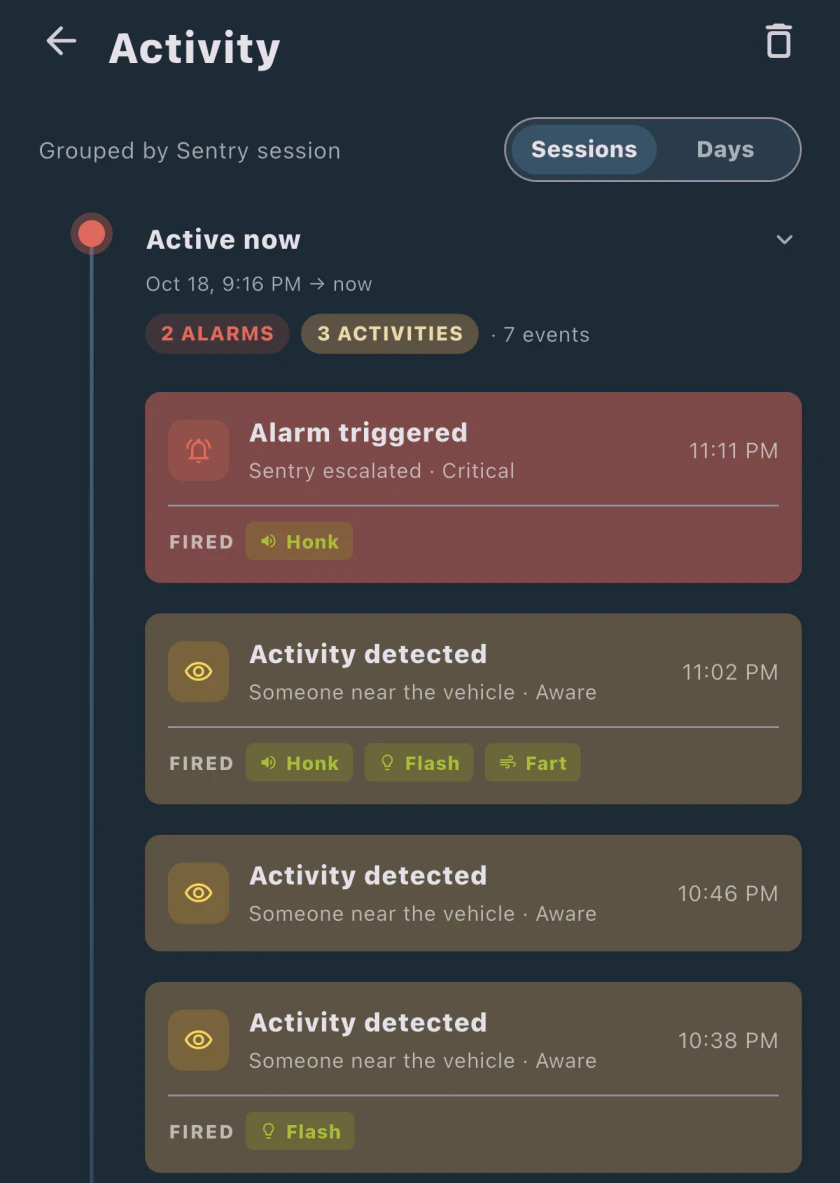
Sentry Actions can answer either kind of event with a honk, a flash of the headlights or a fart sound from the car’s external speaker, the same all day or different by time of day. They need you to give Sentry Pro the Vehicle Commands permission on your Tesla account, and Sentry Pro spaces repeated actions out and caps how many it sends a day. Alerts and actions run on a Sentry Pro subscription.
Sentry Pro only passes on what the car reports. It doesn’t change what sets Sentry Mode off or how sensitive it is, and an event the car doesn’t report never reaches the app.
Frequently Asked Questions
What triggers Tesla Sentry Mode?
Tesla's owner's manuals describe two things that set off Sentry Mode's full reaction while the car is locked and in Park: a threat it detects, and a lot of jerky movement, such as the car being towed or shaken. The car then pulses its headlights, sounds the alarm, shows a touchscreen message that cameras may be recording, alerts you in the Tesla app and saves the clip to a USB drive if one is installed. Someone attempting to open a door or trunk also triggers a Tesla app notification. Tesla publishes no thresholds; it says Sentry Mode 'uses many factors to determine whether to activate the security alarm.' Events it doesn't consider a clear threat are recorded without the alarm and without a notification.
What does 'Sentry activated' mean on a Tesla?
It usually means Sentry Mode went off; Tesla's manuals don't use the phrase. When a threat or jerky movement such as towing triggers Sentry Mode, the headlights pulse, the alarm sounds, the touchscreen shows a message that cameras may be recording, the Tesla app alerts you and the clip is saved to a USB drive if one is installed. That is different from Sentry Mode simply being on: then it sits idle, 'ready to sound the alarm and save a recording of the security event if triggered', and its icon is red.
Can I change Sentry Mode's sensitivity?
No. Tesla's current owner's manuals describe no sensitivity setting; they only say Sentry Mode 'uses many factors to determine whether to activate the security alarm.' What you can change: turn off Camera-Based Detection (Controls > Safety > Sentry Mode > Camera-Based Detection) so the car only saves clips when it detects a physical threat; turn on Disable Sentry Sounds (Controls > Safety > Disable Sentry Sounds in Tesla's US manuals) to silence the alarm while still getting the app notification and the last 10 minutes of footage; or use Exclude Home, Exclude Work or Exclude Favorites so Sentry Mode doesn't switch on automatically at those places. The 2012-2020 Model S manual doesn't mention Disable Sentry Sounds, and the UK and EU manuals mention it only for Pet Mode.
Does Tesla notify me every time Sentry Mode triggers?
No. Tesla's manuals say Sentry Mode only sends a notification to the Tesla app when the alarm is triggered, when someone attempts to open a door or trunk, or when the car detects sudden jerky motion. Events Sentry Mode doesn't consider a clear threat are recorded without a notification. Sentry Pro, a third-party app, reads the Sentry Mode state the car reports through Tesla's Fleet Telemetry and sends an alert for activity as well as alarms, with a Sentry Pro subscription. It can only report what the car reports.