Tesla Key Card and Key Fob: Pairing, Lost Keys and Fob Battery
Your phone is the everyday key on most Teslas, and a key card is the backup Tesla tells you to carry at all times. On Model 3 and Model Y a key fob is an extra you buy; on a 2012–2020 Model S or 2015–2020 Model X it’s the main key. To add a card or fob, touch Controls > Locks > Keys > Add Key, scan the new key and then one that’s already paired. If one goes missing, delete it from the key list before you pair a replacement. Model 3 and Model Y fobs run on a CR2032 coin cell.
The keys your Tesla uses
| Model | Keys | Tap the card outside | Inside card reader | Fob battery |
|---|---|---|---|---|
| Model 3 (2024 and newer), Model Y (2025 and newer) | Phone key, key card, key fob (accessory) | Driver’s door pillar | Wireless phone charger | CR2032 |
| Model 3 (2017–2023), Model Y (2020–2024) | Phone key, key card (two supplied), key fob (accessory) | Driver’s door pillar | Behind the cup holders | CR2032 |
| Model S (2021 and newer) | Phone key, key card (two supplied), key fob (not with every car) | Driver’s door pillar | Wireless phone charger | CR2330 |
| Model X (2021 and newer) | Phone key, key card (two supplied), key fob (not with every car) | Driver’s door pillar | Wireless phone charger | CR2354 |
| Cybertruck | Phone key, key card (two supplied) | Driver’s door pillar | Wireless phone chargers | No fob |
| Model S (2012–2020) | Key fob (up to three) | – | – | CR2032 |
| Model X (2015–2020) | Key fob (up to seven) | – | – | CR2354 |
A key card won’t lock or unlock the car on its own. You have to tap it every time, and Walk-Away Door Lock only works with a phone key or fob. Tesla says to keep a card in your wallet in case your phone’s lost, stolen or flat, and never to leave one in the car, even when you’ve got your phone on you.
On a 2021 or newer Model S or Model X, the market, configuration and build date decide whether you get a fob. Tesla’s 2012–2020 Model S and 2015–2020 Model X manuals cover only the fob, so you’ll find separate steps for those cars below.
Adding a key card or key fob
You’ll need a key card or fob that’s already paired with the car on every model except the 2012–2020 Model S and 2015–2020 Model X (see below). Sit inside, then:
- Touch Controls > Locks > Keys > Add Key.
- Scan the new card or fob on the inside card reader (see the table). Either phone charger works on a 2024 and newer Model 3 or 2025 and newer Model Y.
- Once the car recognizes it, confirm by scanning a card or fob that’s already paired.
- Touch the pencil icon next to the new key and name it something you’ll recognize.
On a 2021 or newer Model S or Model X, you scan a fob by placing it at the top of the left phone charger, against the center divider, with the front pointing down (Model S) or left (Model X), then swiping downward. Pair a Model 3 or Model Y fob at room temperature: Tesla says a very cold one may not pair.
From the Tesla app. The owner can also pair a card or fob from the app. That’s handy when there’s no working card or fob to confirm with. According to Tesla, it’s supported with version 4.29.0 of the Tesla app on cars running software 2022.40 or higher. Touch Security & Drivers > Add Key Card while you’re inside or near the car, scan the new key on the inside reader, and touch Done when the app confirms.
Limits. Model 3, Model Y, Cybertruck and the 2021 and newer Model S and Model X hold up to 19 keys, and no more than three devices (phone keys, fobs or watch keys) can be connected at a time. If the list’s full, use a key card to delete a key before you add another. Tesla says to schedule a service appointment if you don’t have a card to hand. With a leased car, ask the leasing company to add or remove keys.
2012–2020 Model S and 2015–2020 Model X. On the Model S, you pair up to three fobs at Controls > Service > Key Fob Pairing, with a paired key on hand or Remote Access enabled in the app. Tesla warns that keys not paired during the process may stop working, so bring every fob you use, then follow the on-screen steps. The Model X recognizes up to seven fobs; to get a new one, contact Tesla and take all your fobs along for reprogramming.
Removing a key
Keys are removed on the touchscreen; Tesla’s manuals don’t describe a way to do it from the app. Touch Controls > Locks, find the key, touch its trash icon and, when asked, scan a paired card or fob on the card reader. Because the car must always keep at least one key card or fob, you can’t delete the last key card on the list.
To know what to look for in that list, see how to check your keys and your Tesla Account. Apps you’ve given a virtual key show up in the same list. Bought the car used? Before you delete anything you can’t identify, work through reviewing drivers and keys in our handover checklist.
If you lose a key card or key fob
On every model except the 2012–2020 Model S and 2015–2020 Model X, work through these steps in order:
- Delete the lost key at Controls > Locks (trash icon), and confirm by scanning a card or fob you’ve still got. Once it’s off the list, it can’t access the car anymore.
- Buy a replacement on the Tesla Shop, where you can check what’s available in your region and what it currently costs.
- Pair it with the steps above.
For a 2012–2020 Model S or 2015–2020 Model X, contact Tesla about a replacement fob and take every fob you still have so they can be reprogrammed.
Lost every card and fob? If you lose both key cards on a Cybertruck, Tesla’s instruction is to schedule a service appointment in the Tesla app to have them replaced and paired. On Model 3, Model Y and the 2021 and newer Model S and Model X, the owner can pair a replacement from the Tesla app (Tesla says this helps when you’ve got no working card or fob) and then use it to confirm deleting the lost ones. If you can’t pair a key that way, schedule a service appointment.
PIN to Drive adds a second layer. While it’s on, the car can’t be driven until someone enters a four-digit PIN. Switch it on at Controls > Safety > PIN to Drive.
Key card not working? Where to tap it
First, check where and how you’re holding the card:
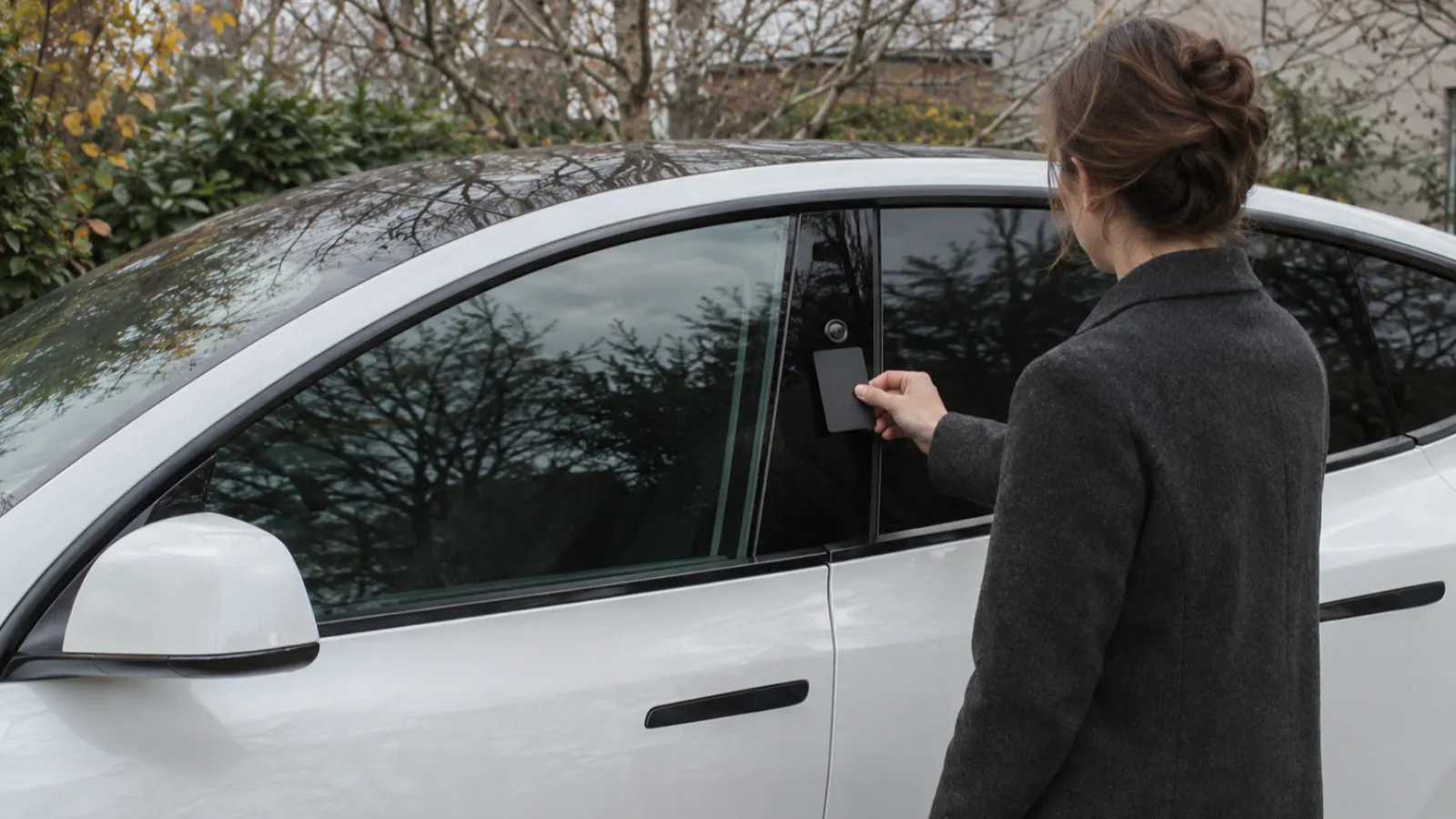
- Outside, tap the driver’s side door pillar. That’s where the reader is: about a third of the way up the pillar, Tesla’s manuals say, and on Model 3 and Model Y also just below the camera.
- Touch, then hold. The card has to touch the pillar, not just come close, and stay there for a second or two (a few seconds on Cybertruck). Once the car reads it, the exterior lights flash and the doors unlock or lock.
- Inside, you’ve got two minutes. You need to press the brake within two minutes of tapping the card to power up. Miss that window and the touchscreen says driving requires authentication; put the card on the inside reader (see the table) and you get another two minutes. In some regions, Tesla’s UK manuals for the 2024 and newer Model 3 and 2025 and newer Model Y say one minute.
- Don’t charge your phone on top of it. Tesla warns that an NFC card sitting on or behind a phone while it charges wirelessly, as in a case that holds cards, can be damaged.
- Check it’s paired with this car. A card only works on the cars it’s been paired with. To see every key that can access yours, look under Controls > Locks.
- Try another paired card. If the second card works, the first one may be faulty, so replace it and then delete the old one from the key list.
If the car won’t respond to the card, the app or any other key, it may have no low-voltage power. For how to get in safely, see what to do if your Tesla is dead.
Tapping the card also silences the security alarm on Model 3, Model Y and Cybertruck. For every model’s method, see how to stop a false alarm.
Changing the key fob battery
A fob battery lasts up to about a year in normal use, according to Tesla. The car shows a message when it’s low (on the instrument panel in a 2012–2020 Model S or 2015–2020 Model X, on the touchscreen in every other car). Model 3 and Model Y fobs and the 2012–2020 Model S fob take a CR2032, the 2021 and newer Model S fob takes a CR2330, and Model X fobs take a CR2354.
- Set the fob button side down on something soft and use a small flat-bladed tool to release the bottom cover. If it’s a Model X fob with a lanyard, there’s another way: press your thumb on the “X” on the cover and pull the lanyard firmly toward you.
- Lift the old battery out of the retaining clips.
- Wipe the new battery clean and fit it ’+’ side up, keeping your fingers off its flat faces: Tesla says finger marks can shorten battery life. In a Model X fob it should press against the spring on the positive contact, so don’t force it straight down onto the contact.
- Angle the cover so its tabs line up with the slots on the fob, then press until it snaps into place.
- Check the fob works by locking and unlocking the car.
Keep coin cells away from children. Tesla warns that a swallowed one can cause severe internal burns within two hours, so if you suspect that’s happened, get medical help immediately. On the 2012–2020 Model S and 2015–2020 Model X, Tesla recommends replacing the batteries in all your fobs at the same time.
A fob with a dead battery still works if you hold it in the right spot:
- Model 3 and Model Y: to drive, scan it on the door-pillar card reader the same way you would a key card.
- Model S and Model X (2021 and newer): scan it on the door-pillar reader to unlock, then at the top of the left phone charger to drive.
- Model S (2012–2020) and Model X (2015–2020): to unlock a Model S, hold the fob by the base of the passenger-side windshield wiper and press the front passenger door handle; on a Model X, hold it at the base of the driver’s side pillar by the falcon wing door and press the driver’s door handle. To drive, press the brake while holding the bottom of the fob against the center console, just below the low-voltage power outlet. Doing this turns off walk-away locking, so turn it back on once you’ve replaced the battery.
Frequently Asked Questions
How many keys can a Tesla have?
Up to 19 on Model 3, Model Y, Cybertruck and the 2021 and newer Model S and Model X, with at most three devices (phone keys, fobs or watch keys) connected at once. When all 19 slots are full, delete one with a key card before you add another. The 2012–2020 Model S recognizes up to three key fobs, and the 2015–2020 Model X up to seven.
Can I add a Tesla key card from the app?
Yes, if you're the car's owner. Inside or near the car, open the Tesla app, touch Security & Drivers > Add Key Card and scan the new card or fob on the car's inside card reader. Tesla says this is supported with version 4.29.0 of the Tesla app on cars running software 2022.40 or higher, and it's useful when you don't have a working card or fob. To remove a key, use the car's touchscreen.
What do I do if I lose my Tesla key card?
Delete it from the car first: touch Controls > Locks, then the trash icon next to the card, and confirm by scanning a card or fob you still have. Then buy a replacement from the Tesla Shop and pair it under Controls > Locks > Keys > Add Key. With no other card or fob to scan, the owner can pair the replacement from the Tesla app first, then delete the lost card. If you lose both key cards on a Cybertruck, Tesla says to schedule a service appointment in the app to replace and pair them.
Where do I tap my Tesla key card?
On the driver's side door pillar. Tesla's manuals describe the reader as about a third of the way up the pillar and, on Model 3 and Model Y, also as just below the camera. Touch the card to the pillar and hold it there for a second or two (a few seconds on Cybertruck). Inside, the reader is in the wireless phone charger, or behind the cup holders on a 2017–2023 Model 3 or 2020–2024 Model Y.
What battery does a Tesla key fob take?
A CR2032 coin cell for Model 3 and Model Y fobs and the 2012–2020 Model S, a CR2330 for the 2021 and newer Model S, and a CR2354 for Model X. Fit it with the '+' side facing up and try not to touch its flat faces. Cybertruck doesn't use a fob.
Does a Tesla come with a key fob?
It depends on the model. On Model 3 and Model Y the fob is an accessory you buy separately. A 2021 or newer Model S or Model X may or may not come with one, depending on the market, configuration and build date. Cybertruck uses phone keys and key cards only. On the 2012–2020 Model S and 2015–2020 Model X, the fob is the car's key.